本文介绍了将法语字幕电影转为中文字幕的方法。通过组合paddlehub的法语文本识别和百度云的文本翻译功能,步骤包括逐帧抽取影片为图片,提取含字母区域并识别文本,调用百度翻译得到中文,将中文字幕输出到原图片,最后合成视频文件,并给出了具体代码示例。
☞☞☞AI 智能聊天, 问答助手, AI 智能搜索, 免费无限量使用 DeepSeek R1 模型☜☜☜

看到有些法语电*频里只有法语字幕,没有被翻译,俗称“生肉”,那么如何把生肉煮熟呢?发现百度有两个工具组合起来可以做到:paddlehub 提供的法语文本识别和百度云提供的文本翻译功能。于是组合起来试了一下,这个效果:
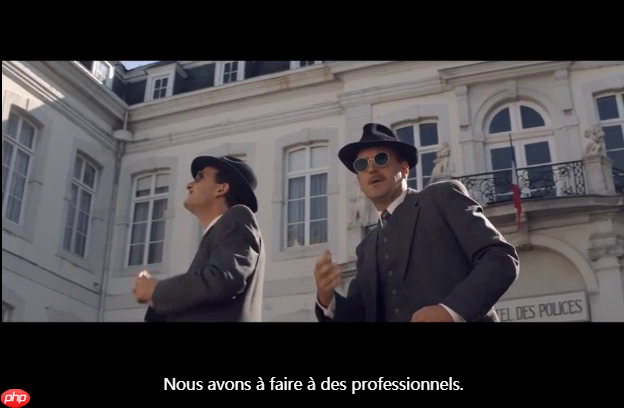
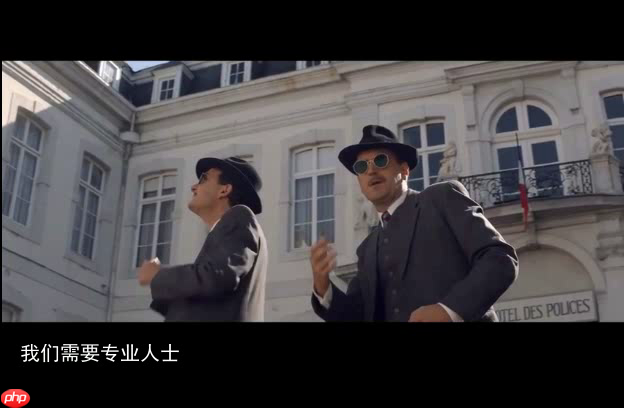
本示例演示了将法语字幕电影转为中文字幕的方法,步骤如下:
In [ ]
 Openflow
一键极速绘图,赋能行业工作流
 88
查看详情
88
查看详情

# 进度条 def process_bar(percent, start_str='', end_str='', total_length=0): bar = ''.join(["="] * int(percent * total_length)) + '' bar = '\r' + start_str +' ['+ bar.ljust(total_length) + ']{:0>4.1f}% '.format(percent*100) + end_str print(bar, end='', flush=True) process_bar(75/100, start_str='f_name', end_str='', total_length=50)f_name [===================================== ]75.0%
In [ ]
#由于PaddleHub升级比较快,建议大家直接升级到最新版本的PaddleHub,无需指定版本升级 !pip install paddlehub --upgrade -i https://pypi.tuna.tsinghua.edu.cn/simple #该Module依赖于第三方库shapely、pyclipper,使用该Module之前,请先安装shapely、pyclipper !pip install shapely -i https://pypi.tuna.tsinghua.edu.cn/simple !pip install pyclipper -i https://pypi.tuna.tsinghua.edu.cn/simple #安装 法语识别预训练模型 !hub install french_ocr_db_crnn_mobile==1.0.0 #安装视频处理库 !pip install moviepy -i https://pypi.tuna.tsinghua.edu.cn/simple
In [ ]
from PIL import Image import numpy as np import os import cv2 import matplotlib.pyplot as plt import matplotlib.image as mpimg import paddlehub as hub import cv2 ocr = hub.Module(name="french_ocr_db_crnn_mobile") #result = ocr.recognize_text(images=[cv2.imread('/PATH/TO/IMAGE')])[2025-03-25 19:27:36,079] [ WARNING] - The _initialize method in HubModule will soon be deprecated, you can use the __init__() to handle the initialization of the object
In [ ]
!ls data/data76619/video-001.mp4
data/data76619/video-001.mp4
In [ ]
from IPython.display import HTML HTML("""<h3>处理前视频</h3><iframe style="width:98%;height: 450px;" src="//player.bilibili.com/player.html?bvid=BV1LX4y1G7ez&cid=186472861&page=1" scrolling="no" border="0" frameborder="no" framespacing="0" allowfullscreen="true" > </iframe>""")<IPython.core.display.HTML object>
使用您的百度账号登录百度翻译开放平台(http://api.fanyi.baidu.com); 注册成为开发者,获得APPID; 进行开发者认证(如仅需标准版可跳过); 开通通用翻译API服务:开通链接 参考技术文档和示例: python Demo
配置文件名为 config.txt ,格式是json,内容举例:
{"appid":"2025009693695","appkey":"Jwo)n2mdwxsAdRfgwp"}
In [ ]
# 加载配置 import json cfg=json.loads(open("config.txt","r").read())In [ ]
# -*- coding: utf-8 -*- # This code shows an example of text translation from English to Simplified-Chinese. # This code runs on Python 2.7.x and Python 3.x. # You may install `requests` to run this code: pip install requests # Please refer to `https://api.fanyi.baidu.com/doc/21` for complete api document import requests import random import json from hashlib import md5 # 调用翻译 def translate_to_cn(query,from_lang='zh'): # Set your own appid/appkey. appid = cfg["appid"] #你的appid appkey = cfg["appkey"] #你的密钥 # For list of language codes, please refer to `https://api.fanyi.baidu.com/doc/21` #from_lang = 'fra' to_lang = 'zh' endpoint = 'http://api.fanyi.baidu.com' path = '/api/trans/vip/translate' url = endpoint + path #query = "La folle histoire de Max et Léon " # Generate salt and sign def make_md5(s, encoding='utf-8'): return md5(s.encode(encoding)).hexdigest() salt = random.randint(32768, 65536) sign = make_md5(appid + query + str(salt) + appkey) # Build request headers = {'Content-Type': 'application/x-www-form-urlencoded'} payload = {'appid': appid, 'q': query, 'from': from_lang, 'to': to_lang, 'salt': salt, 'sign': sign} # Send request r = requests.post(url, params=payload, headers=headers) svr_result = r.json() #svr_result_dic = json.dumps(svr_result, indent=4, ensure_ascii=False) try : tmp = svr_result["trans_result"] if len(tmp)<=0: return "" else: return tmp[-1]["dst"] except Exception: print(r) return "" # 测试一下 rst = translate_to_cn("La folle histoire de Max et Léon ","fra") print(rst)麦克斯和利昂的疯狂故事
In [ ]
%cd ~ # 视频逐帧处理:输入MP4,输出*i from PIL import Image import numpy as np import os import cv2 import matplotlib.pyplot as plt import matplotlib.image as mpimg def video_process(src_file,dst_path='',proc=lambda x:x,sample=None,bar=True): src_video = cv2.VideoCapture(src_file) f_name=os.path.join(dst_path,src_file.split(os.sep)[-1].split('.')[0]+('.sample_%d'%sample if type(sample)==int else '')+'.*i') frame_size = ( int(src_video.get(3)),int(src_video.get(4))) frame_rate =int(src_video.get(5)) frame_cnt =int(src_video.get(7)) # 进度条 def process_bar(percent, start_str='', end_str='', total_length=0): bar = ''.join(["="] * int(percent * total_length)) + '' bar = '\r' + start_str +' ['+ bar.ljust(total_length) + ']{:0>4.1f}% '.format(percent*100) + end_str print(bar, end='', flush=True) fourcc = cv2.VideoWriter_fourcc(*'XVID') #fourcc = cv2.VideoWriter_fourcc('I','4','2','0') #fourcc = cv2.VideoWriter_fourcc('M','J','P','G') dst_video = cv2.VideoWriter( f_name, fourcc, frame_rate, frame_size , True ) count = 0 while True: flag, frame = src_video.read() if flag: if (type(sample)==int and count%sample==0) or type(sample)!=int: _frm_ = frame _frm_ = cv2.cvtColor(_frm_, cv2.COLOR_BGR2RGB) _frm_ = Image.fromarray(_frm_) _frm_ = proc(_frm_) _frm_ = np.array(_frm_) _frm_ = cv2.cvtColor(_frm_, cv2.COLOR_RGB2BGR) dst_video.write(_frm_) count = count + 1 if bar: process_bar(count/frame_cnt, start_str=f_name, end_str='', total_length=50) else: dst_video.release() src_video.retrieve() if bar: print() return count ## 原样输出 print('processed {} frames in total.'.format( video_process("data/data76619/video-001.mp4",'work') )) ## sample是每过几帧取1帧(注意只有是整数时才有效),有个隐藏的参数bar用于控制是否打印进度 print('processed {} frames in total.'.format( video_process("data/data76619/video-001.mp4",'',proc=lambda x:x,sample=100) ))/home/aistudio work/video-001.*i [==================================================]100.0% processed 1919 frames in total. video-001.sample_100.*i [==================================================]100.0% processed 1919 frames in total.
In [116]
from PIL import Image , ImageOps , ImageDraw, ImageFont import time import paddlehub as hub import cv2 ocr = hub.Module(name="french_ocr_db_crnn_mobile") def process_frame_img(img_in): img_w,img_h = img_in.size img_out = Image.new( 'RGB', (img_w,img_h), ( 0, 0, 0 ) ) img_out.paste( img_in,( 0,0,img_w,img_h) ) #裁切,取出字幕位置 pos_Y = 323 #print(img_in.size) # (352, 288) region = (0,pos_Y ,img_w,img_h) cropImg = img_in.crop(region) #生成完整图片 img_txt_in = Image.new( 'RGB', (img_w,img_h), ( 0, 0, 0 ) ) img_txt_in.paste( cropImg,region) #img_mask_2.s*e('sample2.jpg') #识别为文字 _tmp_ = np.array(img_txt_in) _tmp_ = cv2.cvtColor(_tmp_, cv2.COLOR_RGB2BGR) ocr_result = ocr.recognize_text(images=[_tmp_])#,cv2.imread("work/video/278.png") #是否有文字 if len(ocr_result[0]['data'])<=0: #如果为空,使用原图片 pass elif len(ocr_result[0]['data'][-1]['text'])<=0: #识别长度为0,使用原图片 pass else: #不为空则翻译 time.sleep(1) trans_cn_txt = translate_to_cn(ocr_result[0]['data'][-1]['text'],"fra") #生成字幕 font_size = 20 font = ImageFont.truetype("data/data76619/simhei.ttf", font_size, encoding="unic")#设置字体 back_color = 'black' img_txt_out = Image.new("RGB", ( img_w , img_h - pos_Y ), back_color) img_txt_out_pen = ImageDraw.Draw(img_txt_out) img_txt_out_pen.text((font_size, font_size), trans_cn_txt, 'white', font) #img_txt_out.s*e('sample3.jpg') #合成到原位置 img_out.paste( img_txt_out ,region ) return img_out[2025-03-25 22:43:37,006] [ WARNING] - The _initialize method in HubModule will soon be deprecated, you can use the __init__() to handle the initialization of the object
In [117]
print('processed {} frames in total.'.format( video_process("data/data76619/video-001.mp4",'',proc=process_frame_img,sample=1) ))[2025-03-25 22:43:49,277] [ WARNING] - The _initialize method in HubModule will soon be deprecated, you can use the __init__() to handle the initialization of the object
video-001.sample_1.*i [==================================================]100.0% processed 1919 frames in total.
In [118]
from IPython.display import HTML HTML("""<h3>处理后视频</h3><iframe style="width:98%;height: 450px;" src="//player.bilibili.com/player.html?bvid=BV1554y1h7im&cid=186472861&page=1" scrolling="no" border="0" frameborder="no" framespacing="0" allowfullscreen="true" > </iframe>""")<IPython.core.display.HTML object>
下面是实验用到的
In [ ]
# 视频逐帧存图片文件 import os import cv2 import matplotlib.pyplot as plt import matplotlib.image as mpimg %cd ~ def extract_images(src_video_, dst_dir_): video_ = cv2.VideoCapture(src_video_) count = 0 while True: flag, frame = video_.read() if not flag: break cv2.imwrite(os.path.join(dst_dir_, str(count) + '.png'), frame) #print(os.path.join(dst_dir_, str(count) + '.png')) #print(count) count = count + 1 print('extracted {} frames in total.'.format(count)) src_video = '/home/aistudio/data/data76619/video-001.mp4' dst_dir_ = '/home/aistudio/work/video' extract_images(src_video, dst_dir_)/home/aistudio extracted 1919 frames in total.
In [ ]
%cd ~ os.listdir('/home/aistudio/data/data76619/video-001.mp4')
/home/aistudio
['video-001.mp4']
In [ ]
# 以下示例在pil中剪切部分图片 from PIL import Image #im1 = Image.open("work/video/278.png") im1 = Image.open("work/video/1.png") print(im1.size) # (352, 288) region = (0,323,624,408) #裁切图片 cropImg = im1.crop(region) cropImg.s*e('sample.jpg') img_mask_2 = Image.new( 'RGB', (624, 408), ( 0, 0, 0 ) ) #img_mask_2.paste( cropImg,( 0,323,624 ,85 ) ) img_mask_2.paste( cropImg,( 0,323,624 ,408 ) ) img_mask_2.s*e('sample2.jpg') import paddlehub as hub import cv2 ocr = hub.Module(name="french_ocr_db_crnn_mobile") result = ocr.recognize_text(images=[cv2.imread('sample2.jpg')])#,cv2.imread("work/video/278.png") print(result)(624, 408)
[2025-03-25 21:12:53,272] [ WARNING]
- The _initialize method in HubModule will soon be deprecated, you can use the __init__() to handle the initialization of the object
[2025-03-25 21:12:53,730] [ WARNING] - The _initialize method in HubModule will soon be deprecated, you can use the __init__() to handle the initialization of the object
[{'s*e_path': '', 'data': []}]In [ ]
# 中文字体 # 将字体文件复制到matplotlib字体路径 !cp data/data76619/simhei.ttf /opt/conda/envs/python35-paddle120-env/lib/python3.7/site-packages/matplotlib/mpl-data/fonts/ttf/ # 一般只需要将字体文件复制到系统字体目录下即可,但是在aistudio上该路径没有写权限,所以此方法不能用 # !cp simhei.ttf /usr/share/fonts/ # 创建系统字体文件路径 !mkdir .fonts # 复制文件到该路径 !cp data/data76619/simhei.ttf .fonts/ !rm -rf .cache/matplotlib
In [ ]
print(trans_cn_txt) from PIL import Image , ImageOps , ImageDraw, ImageFont font_size = 20 str_out = trans_cn_txt font = ImageFont.truetype("data/data76619/simhei.ttf", font_size, encoding="unic")#设置字体 back_color = 'black' d = Image.new("RGB", (624 ,85), back_color) t = ImageDraw.Draw(d) t.text((font_size, font_size), str_out, 'white', font) #d.s*e('sample3.jpg') from PIL import Image im1 = Image.open("work/video/278.png") im1.paste( d,( 0,323,624 ,408 ) ) im1.s*e('sample3.jpg')在过去的几年里
In [1]
<br/>
Looking in indexes: https://pypi.tuna.tsinghua.edu.cn/simple Requirement already satisfied: moviepy in /opt/conda/envs/python35-paddle120-env/lib/python3.7/site-packages (1.0.1) Requirement already satisfied: decorator<5.0,>=4.0.2 in /opt/conda/envs/python35-paddle120-env/lib/python3.7/site-packages (from moviepy) (4.4.0) Requirement already satisfied: imageio<3.0,>=2.5; python_version >= "3.4" in /opt/conda/envs/python35-paddle120-env/lib/python3.7/site-packages (from moviepy) (2.6.1) Requirement already satisfied: imageio-ffmpeg>=0.2.0; python_version >= "3.4" in /opt/conda/envs/python35-paddle120-env/lib/python3.7/site-packages (from moviepy) (0.3.0) Requirement already satisfied: tqdm<5.0,>=4.11.2 in /opt/conda/envs/python35-paddle120-env/lib/python3.7/site-packages (from moviepy) (4.36.1) Requirement already satisfied: numpy in /opt/conda/envs/python35-paddle120-env/lib/python3.7/site-packages (from moviepy) (1.16.4) Requirement already satisfied: requests<3.0,>=2.8.1 in /opt/conda/envs/python35-paddle120-env/lib/python3.7/site-packages (from moviepy) (2.22.0) Requirement already satisfied: proglog<=1.0.0 in /opt/conda/envs/python35-paddle120-env/lib/python3.7/site-packages (from moviepy) (0.1.9) Requirement already satisfied: pillow in /opt/conda/envs/python35-paddle120-env/lib/python3.7/site-packages (from imageio<3.0,>=2.5; python_version >= "3.4"->moviepy) (7.1.2) Requirement already satisfied: urllib3!=1.25.0,!=1.25.1,<1.26,>=1.21.1 in /opt/conda/envs/python35-paddle120-env/lib/python3.7/site-packages (from requests<3.0,>=2.8.1->moviepy) (1.25.6) Requirement already satisfied: chardet<3.1.0,>=3.0.2 in /opt/conda/envs/python35-paddle120-env/lib/python3.7/site-packages (from requests<3.0,>=2.8.1->moviepy) (3.0.4) Requirement already satisfied: certifi>=2017.4.17 in /opt/conda/envs/python35-paddle120-env/lib/python3.7/site-packages (from requests<3.0,>=2.8.1->moviepy) (2019.9.11) Requirement already satisfied: idna<2.9,>=2.5 in /opt/conda/envs/python35-paddle120-env/lib/python3.7/site-packages (from requests<3.0,>=2.8.1->moviepy) (2.8)
In [13]
#from moviepy.editor import AudioFileCLip #audio = AudioFileCLip("data/data76619/video-001.mp4") # 返回音频 from moviepy.editor import VideoFileClip audio = VideoFileClip("data/data76619/video-001.mp4").audio # 返回音频return video.audio video = VideoFileClip("data/data76619/video-001.mp4")# ("video-001.sample_1.*i")# 设置视频的音频 video = video.set_audio(audio)# 保存新的视频文件 video.write_videofile("video-001.audio_1.mp4") !ls -lchunk: 9%|▊ | 122/1412 [00:00<00:02, 632.17it/s, now=None]
Moviepy - Building video video-001.audio_1.mp4. MoviePy - Writing audio in video-001.audio_1TEMP_MPY_wvf_snd.mp3
chunk: 12%|█▏ | 169/1412 [00:00<00:02, 566.89it/s, now=None]
t: 3%|▎ | 54/1920 [00:00<00:03, 493.29it/s, now=None]
MoviePy - Done. Moviepy - Writing video video-001.audio_1.mp4
t: 4%|▎ | 69/1920 [00:00<00:06, 288.91it/s, now=None]
<br/>
Moviepy - Done ! Moviepy - video ready video-001.audio_1.mp4 total 15936 -rw-r--r-- 1 aistudio users 27504 Mar 26 08:37 1709934.ipynb -rw-r--r-- 1 aistudio aistudio 61 Mar 25 21:28 config.txt drwxrwxrwx 3 aistudio users 4096 Mar 26 08:16 data -rw-r--r-- 1 aistudio users 4610545 Mar 26 08:37 video-001.audio_1.mp4 -rw-r--r-- 1 aistudio aistudio 11664928 Mar 25 23:34 video-001.sample_1.*i drwxr-xr-x 4 aistudio aistudio 4096 Mar 25 23:33 work
以上就是法式牛排烹饪实验(AI创造营 · 第一期)的详细内容,更多请关注其它相关文章!
# 视频文件
# 怎么进行网站优化
# 企业营销推广茶业的方法
# 黄石抖音seo方法公司
# 易县seo网站优化
# 庐阳区网站优化排名推广
# 最可怕关键词排名
# 产品的整合营销推广方案
# 营销套餐推广视频文案
# 低价网站建设流程
# 石榴网络营销推广
# 标准版
# 法文
# 为空
# 官网
# python
# 一言
# 中文网
# 第一期
# 中文字幕
# 法语
# play.ht
# type
# fig
# writer
# simplified
# udio
# 百度
# ai
# 工具
相关栏目:
【
Google疑问12 】
【
Facebook疑问10 】
【
优化推广96088 】
【
技术知识133117 】
【
IDC资讯59369 】
【
网络运营7196 】
【
IT资讯61894 】
相关推荐:
人工智能在交通领域的革新:智能解决方案彻底改变交通方式
严打“黑飞”,无人机检测反制设备护航大运会净空安全
新闻传闻:迪士尼可能采用人工智能来控制电影制作成本
日本演员工会提出AI立法建议 要求建立“声音肖像权”
联想首发AI PC于今年秋季,英特尔CEO确认AI PC时代来临
即时 AI再次升级 30秒生成自带动效的网页 生成速度提升100%
2025年贵州省青少年机器人竞赛在安举行
Meta将VR头显最低年龄限制从13岁降至10岁
警惕!AI或致虚假信息泛滥
RoboNeo安装教程
AI拉动PCB发展|行业发现
【趋势周报】全球元宇宙产业发展趋势:ChatGPT的出现,将元宇宙实现至少提前了10年
OpenAI 为开发者推出 GPT 聊天机器人 API 大更新,同时降低价格
生活垃圾智能分类机器人社区展“才能”,征求居民意见
看了天美对AI的布局,我感觉它想得是真明白
稿见AI助手:提升写作效率与质量的必备工具
国内首款大尺寸仿鸵双足机器人“大圣”亮相,穿戴红色战袍
人工智能驱动智能建筑会是未来趋势吗?
鸿蒙OS 4将实现AI大模型集成,余承东表示坚持AI辅助而非AI取代
美图秀秀发布七款 AI 工具:修图一样修视频、打造电影级上镜脸
视觉中国宣布推出AI灵感绘图、画面扩展功能
当一切设备都受到人工智能的控制
导演郭帆:人工智能应用可能会影响《流浪地球 3》的创作开发
猿编程参加人工智能高峰论坛,推动人工智能教育解决方案在千所学校推行
RoboNeo什么时候上线
特斯拉首发人形机器人“擎天柱”亮相世界人工智能大会
2025世界人工智能大会(上海)开幕式纪要
焊接协作机器人或将成为26届埃森展最大看点
数字彩排、虚拟建厂!这家顶级洗衣机工厂敲开“工业元宇宙”之门
郭帆谈ChatGPT:电影行业需要创新,否则人工智能将让电影变得平庸
Bing 聊天机器人现支持在桌面端用语音提问
国内AI大模型“安卓时刻”到来!阿里云通义千问免费、开源、可商用
MIT开发“PhotoGuard”技术保护图像免遭恶意AI编辑
生成式AI与云结合,机遇与挑战并存
陈根教授:离人形机器人时代还有10年吗?
Valve 将拒绝采用 AI 生成未知版权内容的游戏上架 Steam
AI智能室内效果图设计软件效果,确实惊到我了!
OpenAI更新GPT-4等模型,新增API函数调用,价格最高降75%
美的推出 AI 双视精准避障的自动集尘扫拖机器人 V12,售价仅为2999元
OpenAI CEO 阿尔特曼到访日本,对全球 AI 协调合作表示乐观
比尔盖茨:AI确实存在风险,但可控
云南首例达芬奇机器人微创心脏手术成功开展
GPT-4是如何工作的?哈佛教授亲自讲授
13万个注释神经元,5300万个突触,普林斯顿大学等发布首个完整「成年果蝇」大脑连接组
周星驰支持的人工智能与 Web3 初创公司 Moonbox 完成 100 万美元融资
五个出色的人工智能应用实例
马斯克称人类是半机器人,记忆外包给了电脑
从GOXR到PartyOn,XRSPACE致力打造多元共赢的元宇宙世界
李开复官宣新公司「零一万物」,进军 AI 2.0
上海发布“元宇宙关键技术攻关行动方案”,加快 AIGC 等突破
2025-08-01

运城市盐湖区信雨科技有限公司是一家深耕海外推广领域十年的专业服务商,作为谷歌推广与Facebook广告全球合作伙伴,聚焦外贸企业出海痛点,以数字化营销为核心,提供一站式海外营销解决方案。公司凭借十年行业沉淀与平台官方资源加持,打破传统外贸获客壁垒,助力企业高效开拓全球市场,成为中小企业出海的可靠合作伙伴。

 listdir('/home/aistudio/data/data76619/video-001.mp4')