
前言:
集群是指通过添加服务器的数量,提供相同的服务,从而让如武器达到一个稳定、高效的状态。为什么要使用redis集群呢?redis集群可以强化的redis的读写能力。
下面我们就来正式学习下redis集群。
准备工作:
需要4个部件:Redis、Ruby语言运行环境、Redis的Ruby驱动redis-xxxx.gem、创建Redis集群的工具redis-trib.rb。使用redis-trib.rb工具来创建Redis集群,由于该文件是用ruby语言写的,所以需要安装Ruby开发环境,以及驱动redis-xxxx.gem。
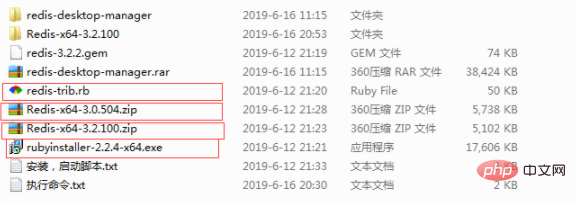
1)下载Redis安装文件:https://github.com/MSOpenTech/redis/releases/,Redis提供msi和zip格式的下载文件,这里下载zip格式Redis-x64-3.2.100版本。
2)下载Ruby安装文件:http://dl.bintray.com/oneclick/rubyinstaller/rubyinstaller-2.2.4-x64.exe
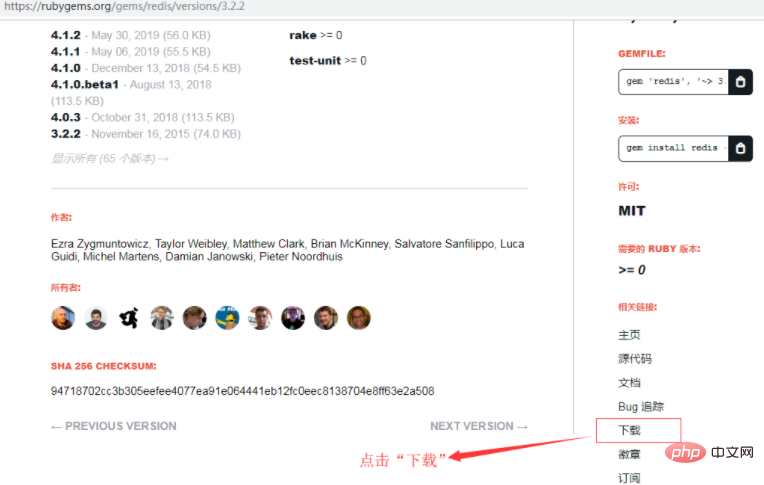
3)下载Ruby环境下Redis的驱动:https://rubygems.org/gems/redis/versions/3.2.2,考虑到兼容性,这里下载的是3.2.2版本
注意:下载在页面右下角相关连接一项中
4)下载Redis官方提供的创建Redis集群的ruby脚本文件redis-trib.rb,路径如下:https://raw.githubusercontent.com/MSOpenTech/redis/3.0/src/redis-trib.rb
安装Redis
将下载到的Redis-x64-3.2.100.zip解压即可,为了方便使用,建议放在盘符根目录下,如:D:\Redis-Cluster\Redis-x64-3.2.100。
安装Redis,并运行3个实例(Redis集群需要至少3个以上节点,低于3个无法创建);
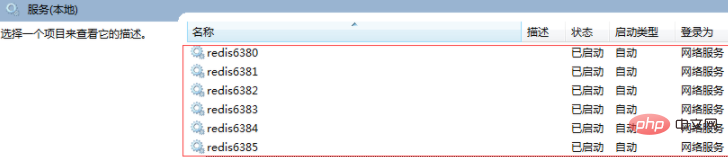
通过配置文件来启动6个不同的Redis实例,由于Redis默认端口为6379,所以这里使用了6380、6381、6382、6383、6384、6385来运行6个Redis实例。
注意:
(1)为了避免不必要的错误,配置文件尽量保存为utf8格式,并且不要包含注释;
(2)配置文件中以下两种保存日志的方式(保存在文件中、保存到System Log中)请根据需求选择其中一种即可:
loglevel notice    #日志的记录级别,notice是适合生产环境的
logfile "D:/Redis-Cluster/Redis-x64-3.2.100/Logs/redis6380_log.txt" #指定log的保持路径,默认是创建在Redis安装目录下,如果有子目录需要手动创建,如此处的Logs目录
syslog-enabled yes    #是否使用系统日志
syslog-ident redis6380    #在系统日志的标识名
这里使用了保存在文件中的方式,所以先在Redis目录D:\Redis-Cluster\Redis-x64-3.2.100下新建Logs文件夹。
在Redis安装根目录下,创建编码格式为utf-8的配置文件:redis.6380.conf、redis.6381.conf、redis.6382.conf、redis.6383.conf、redis.6384.conf、redis.6385.conf。
redis.6380.conf、
port 6380
loglevel notice
logfile "D:/Redis-Cluster/Redis-x64-3.2.100/Logs/redis6380_log.txt"
appendonly yes
appendfilename "appendonly.6380.aof"
cluster-enabled yes
cluster-config-file nodes.6380.conf
cluster-node-timeout 15000
cluster-sl*e-validity-factor 10
cluster-migration-barrier 1
cluster-require-full-coverage yes
redis.6381.conf、
port 6381
loglevel notice
logfile "D:/Redis-Cluster/Redis-x64-3.2.100/Logs/redis6381_log.txt"
appendonly yes
appendfilename "appendonly.6381.aof"
cluster-enabled yes
cluster-config-file nodes.6381.conf
cluster-node-timeout 15000
cluster-sl*e-validity-factor 10
cluster-migration-barrier 1
cluster-require-full-coverage yes
redis.6382.conf、
port 6382
loglevel notice
logfile "D:/Redis-Cluster/Redis-x64-3.2.100/Logs/redis6382_log.txt"
appendonly yes
appendfilename "appendonly.6382.aof"
cluster-enabled yes
cluster-config-file nodes.6382.conf
cluster-node-timeout 15000
cluster-sl*e-validity-factor 10
cluster-migration-barrier 1
cluster-require-full-coverage yes
redis.6383.conf、
port 6383
loglevel notice
logfile "D:/Redis-Cluster/Redis-x64-3.2.100/Logs/redis6383_log.txt"
appendonly yes
appendfilename "appendonly.6383.aof"
cluster-enabled yes
cluster-config-file nodes.6383.conf
cluster-node-timeout 15000
cluster-sl*e-validity-factor 10
cluster-migration-barrier 1
cluster-require-full-coverage yes
redis.6384.conf、
port 6384
loglevel notice
logfile "D:/Redis-Cluster/Redis-x64-3.2.100/Logs/redis6384_log.txt"
appendonly yes
appendfilename "appendonly.6384.aof"
cluster-enabled yes
cluster-config-file nodes.6384.conf
cluster-node-timeout 15000
cluster-sl*e-validity-factor 10
cluster-migration-barrier 1
cluster-require-full-coverage yes
redis.6385.conf
port 6385
loglevel notice
logfile "D:/Redis-Cluster/Redis-x64-3.2.100/Logs/redis6385_log.txt"
appendonly yes
appendfilename "appendonly.6385.aof"
cluster-enabled yes
cluster-config-file nodes.6385.conf
cluster-node-timeout 15000
cluster-sl*e-validity-factor 10
cluster-migration-barrier 1
cluster-require-full-coverage yes
(学习视频分享:redis视频教程)
配置解释如下:
port 6380                                 #端口号
loglevel notice                           #日志的记录级别,notice是适合生产环境的
logfile "Logs/redis6380_log.txt"          #指定log的保持路径,默认是创建在Redis安装目录下,如果有子目录需要手动创建,如此处的Logs目录
syslog-enabled yes                        #是否使用系统日志
syslog-ident redis6380                    #在系统日志的标识名
appendonly yes                            #数据的保存为aof格式
appendfilename "appendonly.6380.aof"      #数据保存文件
cluster-enabled yes                       #是否开启集群
cluster-config-file nodes.6380.conf
cluster-node-timeout 15000
cluster-sl*e-validity-factor 10
cluster-migration-barrier 1
cluster-require-full-coverage yes
将上述配置文件保存到Redis目录下,并使用这些配置文件安装6个redis服务,命令如下:
D:/Redis-Cluster/Redis-x64-3.2.100/redis-server.exe --service-install D:/Redis-Cluster/Redis-x64-3.2.100/redis.6380.conf --service-name redis6380
D:/Redis-Cluster/Redis-x64-3.2.100/redis-server.exe --service-install D:/Redis-Cluster/Redis-x64-3.2.100/redis.6381.conf --service-name redis6381
D:/Redis-Cluster/Redis-x64-3.2.100/redis-server.exe --service-install D:/Redis-Cluster/Redis-x64-3.2.100/redis.6382.conf --service-name redis6382
D:/Redis-Cluster/Redis-x64-3.2.100/redis-server.exe --service-install D:/Redis-Cluster/Redis-x64-3.2.100/redis.6383.conf --service-name redis6383
D:/Redis-Cluster/Redis-x64-3.2.100/redis-server.exe --service-install D:/Redis-Cluster/Redis-x64-3.2.100/redis.6384.conf --service-name redis6384
D:/Redis-Cluster/Redis-x64-3.2.100/redis-server.exe --service-install D:/Redis-Cluster/Redis-x64-3.2.100/redis.6385.conf --service-name redis6385
注意:
1)redis.6380.conf等配置文件最好使用完整路径,避免重启Redis集群出现问题
 PHP高级教程
前言 第一部分 基础知识篇 第1章 PHP概述 1.1 PHP入门 1.1.1 PHP介绍 1.1.2 PHP的工作原理 1.1.3 如何学好PHP编程 1.2 PHP环境搭建 1.2.1 PHP相关软件下载 1.2.2 AppServ安装与测试(Windows) 1.2.3 XAMPP安装与测试(Windows) 1.2.4 II
 508
查看详情
508
查看详情

2)卸载命令为:
D:/Redis-Cluster/Redis-x64-3.2.100/redis-server.exe --service-uninstall D:/Redis-Cluster/Redis-x64-3.2.100/redis.6380.conf --service-name redis6380
D:/Redis-Cluster/Redis-x64-3.2.100/redis-server.exe --service-uninstall D:/Redis-Cluster/Redis-x64-3.2.100/redis.6381.conf --service-name redis6381
D:/Redis-Cluster/Redis-x64-3.2.100/redis-server.exe --service-uninstall D:/Redis-Cluster/Redis-x64-3.2.100/redis.6382.conf --service-name redis6382
D:/Redis-Cluster/Redis-x64-3.2.100/redis-server.exe --service-uninstall D:/Redis-Cluster/Redis-x64-3.2.100/redis.6383.conf --service-name redis6383
D:/Redis-Cluster/Redis-x64-3.2.100/redis-server.exe --service-uninstall D:/Redis-Cluster/Redis-x64-3.2.100/redis.6384.conf --service-name redis6384
D:/Redis-Cluster/Redis-x64-3.2.100/redis-server.exe --service-uninstall D:/Redis-Cluster/Redis-x64-3.2.100/redis.6385.conf --service-name redis6385
启动这6个服务,命令如下:
D:/Redis-Cluster/Redis-x64-3.2.100/redis-server.exe --service-start --service-name redis6380
D:/Redis-Cluster/Redis-x64-3.2.100/redis-server.exe --service-start --service-name redis6381
D:/Redis-Cluster/Redis-x64-3.2.100/redis-server.exe --service-start --service-name redis6382
D:/Redis-Cluster/Redis-x64-3.2.100/redis-server.exe --service-start --service-name redis6383
D:/Redis-Cluster/Redis-x64-3.2.100/redis-server.exe --service-start --service-name redis6384
D:/Redis-Cluster/Redis-x64-3.2.100/redis-server.exe --service-start --service-name redis6385
执行结果:
安装ruby
(1)Ruby环境安装。
双击下载的“rubyinstaller-2.2.4-x64.exe”安装即可,同样,为了操作方便,也是建议安装在盘符根目录下,如: C:\Ruby22-x64 ,安装时这里选中后两个选项,
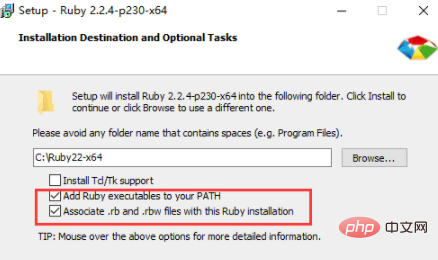
意思是将ruby添加到系统的环境变量中,在cmd命令中能直接使用ruby的命令
(1)安装Ruby环境下Redis的驱动
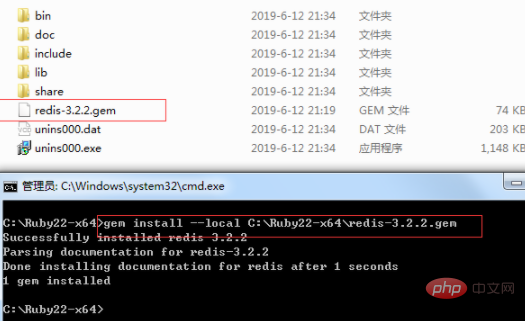
将下载的"Ruby环境下Redis的驱动文件(redis-3.2.2.gem)"拷贝到Ruby安装根目录(C:\Ruby22-x64)下。
然后执行安装命令如下:
gem install --local path_to_gem/filename.gem
创建Redis集群
将下载的“创建Redis集群的ruby脚本文件redis-trib.rb”文件拷贝到Redis安装根目录(D:\Redis-Cluster\Redis-x64-3.2.100)下。
(1)使用redis-trib.rb来创建Redis集群
MD下切换到Redis目录(D:\Redis-Cluster\Redis-x64-3.2.100)
D:/Redis-Cluster/Redis-x64-3.2.100/redis-trib.rb create --replicas 1 127.0.0.1:6380 127.0.0.1:6381 127.0.0.1:6382 127.0.0.1:6383 127.0.0.1:6384 127.0.0.1:6385
D:\Redis-Cluster\Redis-x64-3.2.100>redis-trib.rb create --replicas 1 127.0.0.1:6380 127.0.0.1:6381 127.0.0.1:6382 127.0.0.1:6383 127.0.0.1:6384 127.0.0.1:6385
>>> Creating cluster
Connecting to node 127.0.0.1:6380: OK
Connecting to node 127.0.0.1:6381: OK
Connecting to node 127.0.0.1:6382: OK
Connecting to node 127.0.0.1:6383: OK
Connecting to node 127.0.0.1:6384: OK
Connecting to node 127.0.0.1:6385: OK
>>> Performing hash slots allocation on 6 nodes...
Using 3 masters:
127.0.0.1:6380
127.0.0.1:6381
127.0.0.1:6382
Adding replica 127.0.0.1:6383 to 127.0.0.1:6380
Adding replica 127.0.0.1:6384 to 127.0.0.1:6381
Adding replica 127.0.0.1:6385 to 127.0.0.1:6382
M: bb6ef615bb0ae13275943caec0db9d30b9f35c5e 127.0.0.1:6380   slots:0-5460      (5461 slots) master
M: b4d120f2983ad683f7b68992e1ba414722238db7 127.0.0.1:6381   slots:5461-10922  (5462 slots) master
M: 837779b3965e2c9d4dd4385750aaaaf9a9039fb0 127.0.0.1:6382   slots:10923-16383 (5461 slots) master
S: 5d154137180284d926ef51a91fc75f9438249ef8 127.0.0.1:6383   replicates bb6ef615bb0ae13275943caec0db9d30b9f35c5e
S: ad151680a3e36cf2083ef822be0bdb075a7d36de 127.0.0.1:6384   replicates b4d120f2983ad683f7b68992e1ba414722238db7
S: 9a2260a5a6a2add84b622a453a6a7b86a29d180d 127.0.0.1:6385   replicates 837779b3965e2c9d4dd4385750aaaaf9a9039fb0
Can I set the above configuration? (type 'yes' to accept): yes
>>> Nodes configuration updated
>>> Assign a different config epoch to each node
>>> Sending CLUSTER MEET messages to join the cluster
Waiting for the cluster to join...
>>> Performing Cluster Check (using node 127.0.0.1:6380)M: bb6ef615bb0ae13275943caec0db9d30b9f35c5e 127.0.0.1:6380   slots:0-5460      (5461 slots) master
M: b4d120f2983ad683f7b68992e1ba414722238db7 127.0.0.1:6381   slots:5461-10922  (5462 slots) master
M: 837779b3965e2c9d4dd4385750aaaaf9a9039fb0 127.0.0.1:6382   slots:10923-16383 (5461 slots) master
M: 5d154137180284d926ef51a91fc75f9438249ef8 127.0.0.1:6383   slots:            (0 slots)    master   replicates bb6ef615bb0ae13275943caec0db9d30b9f35c5e
M: ad151680a3e36cf2083ef822be0bdb075a7d36de 127.0.0.1:6384   slots:            (0 slots)    master   replicates b4d120f2983ad683f7b68992e1ba414722238db7
M: 9a2260a5a6a2add84b622a453a6a7b86a29d180d 127.0.0.1:6385   slots:            (0 slots)    master   replicates 837779b3965e2c9d4dd4385750aaaaf9a9039fb0
[OK] All nodes agree about slots configuration.
>>> Check for open slots...
>>> Check slots coverage...
[OK] All 16384 slots covered.
备注:
(1)--replicas #指定集群中每个主节点配备几个从节点,这里设置为1。
(2)redis-trib.rb工具的使用
、create:创建集群
、check:检查集群
、info:查看集群信息
、fix:修复集群
、reshard:在线迁移slot
、rebalance:平衡集群节点slot数量
、add-node:将新节点加入集群
、del-node:从集群中删除节点
、set-timeout:设置集群节点间心跳连接的超时时间
、call:在集群全部节点上执行命令
、import:将外部redis数据导入集群
(2)检验是否真的创建成功
输入以下命令:
redis-trib.rb check 127.0.0.1:6380
如果现实信息如下,则说明创建的Redis集群是没问题。
D:\Redis-Cluster\Redis-x64-3.2.100>redis-trib.rb check 127.0.0.1:6380
Connecting to node 127.0.0.1:6380: OK
Connecting to node 127.0.0.1:6383: OK
Connecting to node 127.0.0.1:6382: OK
Connecting to node 127.0.0.1:6384: OK
Connecting to node 127.0.0.1:6385: OK
Connecting to node 127.0.0.1:6381: OK
>>> Performing Cluster Check (using node 127.0.0.1:6380)
M: bb6ef615bb0ae13275943caec0db9d30b9f35c5e 127.0.0.1:6380   slots:0-5460      (5461 slots) master   1 additional replica(s)
S: 5d154137180284d926ef51a91fc75f9438249ef8 127.0.0.1:6383   slots:            (0 slots)    sl*e    replicates bb6ef615bb0ae13275943caec0db9d30b9f35c5e
M: 837779b3965e2c9d4dd4385750aaaaf9a9039fb0 127.0.0.1:6382   slots:10923-16383 (5461 slots) master   1 additional replica(s)
S: ad151680a3e36cf2083ef822be0bdb075a7d36de 127.0.0.1:6384   slots:            (0 slots)    sl*e    replicates b4d120f2983ad683f7b68992e1ba414722238db7
S: 9a2260a5a6a2add84b622a453a6a7b86a29d180d 127.0.0.1:6385   slots:            (0 slots)    sl*e    replicates 837779b3965e2c9d4dd4385750aaaaf9a9039fb0
M: b4d120f2983ad683f7b68992e1ba414722238db7 127.0.0.1:6381   slots:5461-10922  (5462 slots) master   1 additional replica(s)
[OK] All nodes agree about slots configuration.
>>> Check for open slots...
>>> Check slots coverage...
[OK] All 16384 slots covered.

D:\Redis-Cluster\Redis-x64-3.2.100>
(3)信息查询
使用Redis客户端Redis-cli.exe来查看数据记录数,以及集群相关信息

原文作者:cctext
原文链接:https://www.cnblogs.com/yy3b2007com/p/11033009.html
相关推荐:redis数据库教程
以上就是windows下如何搭建redis集群的详细内容,更多请关注其它相关文章!
# 使用了
# 常州市流程优化咨询网站
# 贵港seo网站优化
# seo钢琴
# 大连seo排名哪家好
# 企业seo收费情况
# 百科网站推广的主要方法
# seo和sem如何应用
# 网络文学app网络营销推广
# 天津企业seo推广
# 湘潭建设网站公司
# 运行环境
# wiindows
# 几个
# 的是
# 保存为
# 如何实现
# 网络带宽
# 目录下
# 这里下载
# 配置文件
# 集群
# redis
相关栏目:
【
Google疑问12 】
【
Facebook疑问10 】
【
优化推广96088 】
【
技术知识133117 】
【
IDC资讯59369 】
【
网络运营7196 】
【
IT资讯61894 】
相关推荐:
Lar*el 关联查询:同时筛选父表与子表数据的高效策略
《搜书吧》阅读书籍方法
使用VS Code作为你的个人知识管理系统
漫蛙漫画直连入口 _ manwa官方备用入口实时检测
喜茶GO更换登录账号方法
Animex动漫社社登录官网 Animex动漫社资源社入口直达
荣耀盒子应用管理技巧
《长生:天机降世》火塔小怪大全
鼠标没反应了怎么办 无线/有线鼠标失灵的解决方法【详解】
以下哪一项是古代兵书三十六计中的计谋
j*a中赋值运算符是什么?
Go语言中方法接收器的选择:值类型还是指针类型?
感染了幽门螺杆菌一定会导致胃癌吗?蚂蚁庄园今日答案最新11.30
在J*a中如何实现在线问答与评分系统_问答评分项目开发方法说明
抖音号升级企业号怎么改名字?升级企业号有哪些好处?
sublime怎么快速在浏览器中预览HTML_sublime配置View in Browser教程
《下一站江湖2》大雪山加入方法
雨课堂官网在线登录 网页版雨课堂登录链接
西瓜视频怎么查看访客记录_西瓜视频访客记录查看方法
微博网页版访问入口 微博网页版网页端使用指南
Python高效统计字典嵌套列表值在目标列表中的出现次数
抖音商城官网是什么_抖音商城官方网址与访问方法
C#中的Record类型有什么优势?C# 9新特性Record与Class的用法区别
PPT智能排版生成入口 免费PPT内容自动生成平台
Go Goroutine调度与并发执行深度解析
Golang如何使用log记录日志信息_Golang log日志记录方法总结
b站怎么用微信登录_b站微信登录方法
Python项目中的条件导入:解决跨模块依赖问题
高德地图怎么查看未来行程规划_高德地图未来行程规划查看方法
MySQL多重关联查询:利用别名高效获取同一表的多个关联字段
解决 Vue 3 组件未定义错误:理解 createApp 与根组件的正确使用
《虎扑》取消评分记录方法
动漫岛在线动漫网 动漫岛动漫在线观看官方入口
Mac怎么关闭按键声音_Mac键盘打字音效设置
家里的小飞虫总是不断,用什么方法可以彻底根除?
FotoBalloon图片左右镜像教程
苹果iPhone14ProMax如何新建AppleID_iPhone14ProMax新建AppleID具体流程
PHP动态导航按钮:根据用户登录状态切换链接与文本
顺丰官方查单号入口 顺丰快递单号查询官网入口
智慧团建活动报名入口 智慧团建活动报名入口手机端官网
如何在CSS中使用过渡制作按钮边框渐变_border-color transition实现
PHP与SQL实践:高效实现数据复制与特定列值修改
CSS如何使用outline-offset与颜色组合突出元素边框
Lar*el Dusk 测试中管理浏览器权限:以剪贴板访问为例
解决CSS布局中意外顶部空白问题的教程
《战地6》反作弊已成功拦截240万次作弊 发售第一周98%比赛没有作弊
Apple Music无故扣费引质疑
cad视图选项卡不见了怎么办_cad视图标签恢复显示方法
蛙漫2(台版)正版官网 2025免费网页版分享
C++如何实现矩阵乘法_C++二维数组矩阵运算代码示例
2021-03-05

运城市盐湖区信雨科技有限公司是一家深耕海外推广领域十年的专业服务商,作为谷歌推广与Facebook广告全球合作伙伴,聚焦外贸企业出海痛点,以数字化营销为核心,提供一站式海外营销解决方案。公司凭借十年行业沉淀与平台官方资源加持,打破传统外贸获客壁垒,助力企业高效开拓全球市场,成为中小企业出海的可靠合作伙伴。