在SpringBoot中,数据的缓存管理存储依赖于Spring框架中cache相关的org.springframework.cache.Cache和org.springframework.cache.CacheManager缓存管理器接口。
如果程序中没有定义类型为CacheManager的Bean组件或者是名为cacheResolver的CacheResolver缓存解析器,SpringBoot将尝试选择启用以下缓存组件(按照指定的顺序):
(1)Generic
(2)JCache (JSR-107) (EhCache 3、Hazelcast、Infinispan等)
(3)EhCache 2.x
(4)Hazelcast
(5)Infinispan
(6)Couchbase
(7)Redis
(8)Caffeine
(9)Simple
上面按照SpringBoot缓存组件的加载顺序,列举了SpringBoot支持的9种缓存组件,在项目中添加某个缓存管理组件(例如Redis)后,SpringBoot项目会选择并启用对应的缓存管理器。如果在项目中同时添加了多个缓存组件,且没有指定缓存管理器或者缓存解析器(CacheManager或者cacheResolver),那么SpringBoot会按照上述顺序在添加的多个缓存组件中优先启用排在前面的某个缓存组件进行缓存管理(例如,同时添加了Couchbase和Redis这两个缓存组件,那么优先启用Couchbase组件)。
在上一篇文章 SpringBoot缓存管理(一) 默认缓存管理 介绍的默认缓存管理中,我们搭建的项目没有添加任何缓存管理组件,但是依旧实现了缓存管理。这是因为开启缓存管理后,SpringBoot会按照上述缓存组件顺序查找有效的缓存组件进行缓存管理,如果没有任何缓存组件,会默认使用最后一个Simple缓存组件进行管理。Simple缓存组件是SpringBoot默认的缓存管理组件,它默认使用内存中的ConcurrentMap进行缓存存储,所以在没有添加任何第三方缓存组件的情况下,依旧可以实现内存中的缓存管理,但是不推荐这种缓存管理方式。
在 SpringBoot缓存管理(一) 默认缓存管理 搭建的项目基础上引入Redis缓存组件,使用基于注解的方式讲解SpringBoot整合Redis缓存的具体实现。
(1)添加Spring Data Redis依赖启动器
在pom.xml文件中添加Spring Data Redis依赖启动器:
<dependency>
  <groupId>org.springframework.boot</groupId>
  <artifactId>spring-boot-starter-data-redis</artifactId>
</dependency>
当我们添加Redis相关的依赖启动器后,SpringBoot会使用RedisCacheConfigratioin作为自动配置类进行缓存相关的自动装配类(之前为默认的SimpleCacheConfiguration),容器中使用的缓存管理器变为了RedisCacheManager(之前为默认为cacheManager),这个缓存管理器创建的Cache为RedisCache,进而操控Redis进行数据的缓存。
(2)Redis服务器连接配置
在项目的全局配置文件application.properties中添加Redis数据库的连接配置,示例代码如下:
# Redis服务器地址
spring.redis.host=127.0.0.1
# Redis服务器连接端口
spring.redis.port=6379
# Redis服务器连接密码(默认为空)
spring.redis.password=
(3)对CommentService类中的方法进行修改
使用@Cacheable、@CachePut、@CacheEvict三个注解进行缓存管理,分别进行缓存存储、缓存更新及缓存删除等操作:
package com.hardy.springbootdatacache.service;

import com.hardy.springbootdatacache.entity.Comment;
import com.hardy.springbootdatacache.repository.CommentRepository;
import org.springframework.beans.factory.annotation.Autowired;
import org.springframework.cache.annotation.CacheEvict;
import org.springframework.cache.annotation.CachePut;
import org.springframework.cache.annotation.Cacheable;
import org.springframework.stereotype.Service;

import j*a.util.Optional;

/**
 * @Author: HardyYao
 * @Date: 2025/6/19
 */
@Service
public class CommentService {

    @Autowired
    private CommentRepository commentRepository;

    /**
     * 根据评论id查询评论
     * @Cacheable:将该方法的查询结果comment存放在SpringBoot默认缓存中
     * cacheNames:起一个缓存命名空间,对应缓存唯一标识
     * @param id
     * @return
     */
    @Cacheable(cacheNames = "comment", unless = "#result==null")
    public Comment findCommentById(Integer id){
        Optional<Comment> comment = commentRepository.findById(id);
        if(comment.isPresent()){
            Comment comment1 = comment.get();
            return comment1;
        }
        return null;
    }

    /**
     * 更新评论
     * @param comment
     * @return
     */
    @CachePut(cacheNames = "comment",key = "#result.id")
    public Comment updateComment(Comment comment) {
        commentRepository.updateComment(comment.getAuthor(), comment.getaId());
        return comment;
    }

    /**
     * 删除评论
     * @param comment_id
     */
    @CacheEvict(cacheNames = "comment")
    public void deleteComment(int comment_id) {
        commentRepository.deleteById(comment_id);
    }

}
在上述代码中,使用了@Cacheable、@CachePut、@CacheEvict注解在数据查询、数据更新及数据删除方法上进行了缓存管理。
其中,查询缓存@Cacheable注解中没有标记key值,将会使用默认参数值comment_id作为key进行数据保存,在进行缓存更新时必须使用同样的的key;同样,在使用查询缓存@Cacheable注解中,定义了 unless= "#result==null" 表示查询结果为空则不进行缓存。
(4)在CommentController类中新增两个接口
新增更新和删除的接口:
package com.hardy.springbootdatacache.controller;

import com.hardy.springbootdatacache.entity.Comment;
import com.hardy.springbootdatacache.service.CommentService;
import org.springframework.beans.factory.annotation.Autowired;
import org.springframework.web.bind.annotation.RequestMapping;
import org.springframework.web.bind.annotation.RestController;

/**
 * @Author: HardyYao
 * @Date: 2025/6/19
 */
@RestController
public class CommentController {

    @Autowired
    private CommentService commentService;

    @RequestMapping(value = "/findCommentById")
    public Comment findCommentById(Integer id){
        Comment comment = commentService.findCommentById(id);
        return comment;
    }

    @RequestMapping(value = "/updateComment")
    public Comment updateComment(Comment comment){
        Comment oldComment = commentService.findCommentById(comment.getId());
        oldComment.setAuthor(comment.getAuthor());
        Comment comment1 = commentService.updateComment(oldComment);
        return comment1;
    }

    @RequestMapping(value = "/deleteComment")
    public void deleteComment(Integer id){
        commentService.deleteComment(id);
    }

}
(5)基于注解的Redis查询缓存测试
在浏览器中输入:http://localhost:8080/findCommentById?id=1 进行访问:
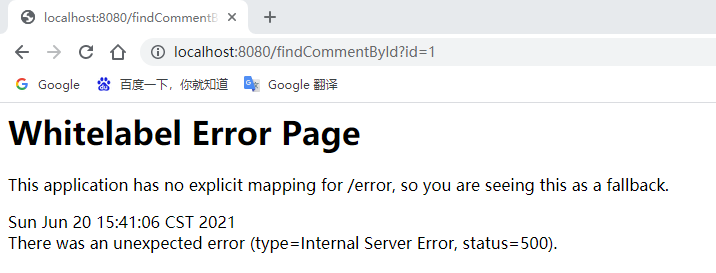
页面报错了,查看控制台信息:

根据报错信息可知:查询用户评论信息Comment时执行了相应的SQL语句,但是在进行缓存存储时出现了IllegalArgumentException非法参数异常,提示信息要求对应的Comment实体类必须实现序列化(DefaultSerializer requires a Serializable payload but received an object of type [com.hardy.springbootdatacache.entity.Comment])。
(6)将缓存对象实现序列化
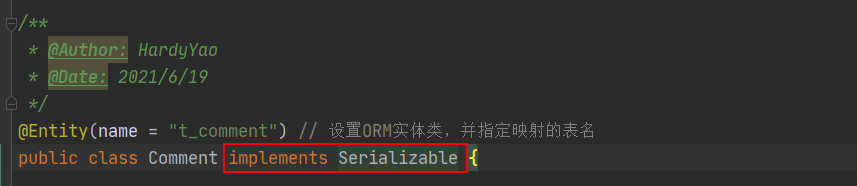
(7)重启项目测试查询缓存
在浏览器中输入:http://localhost:8080/findCommentById?id=1 进行访问(连续访问三次):
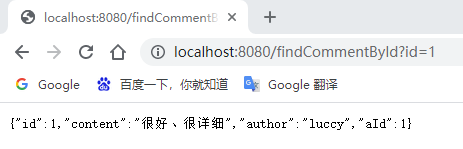
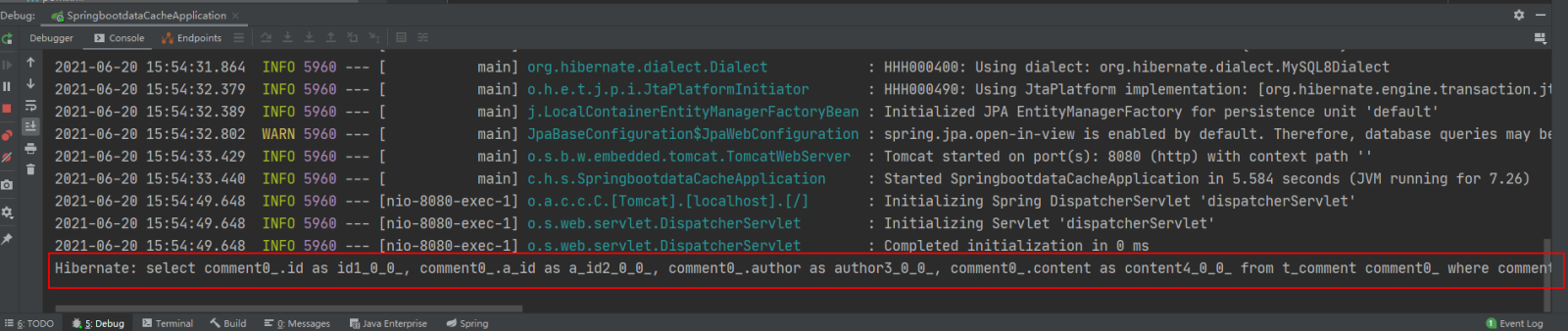
打开Redis客户端可视化工具Redis Desktop Manager,连接本地启用的Redis服务,查看具体的数据缓存效果:
 Android配合WebService访问远程数据库 中文WORD版
采用HttpClient向服务器端action请求数据,当然调用服务器端方法获取数据并不止这一种。WebService也可以为我们提供所需数据,那么什么是webService呢?,它是一种基于SAOP协议的远程调用标准,通过webservice可以将不同操作系统平台,不同语言,不同技术整合到一起。 实现Android与服务器端数据交互,我们在PC机器j*a客户端中,需要一些库,比如XFire,Axis2,CXF等等来支持访问WebService,但是这些库并不适合我们资源有限的android手机客户端,
 0
查看详情
0
查看详情


执行findById()方法查询出的用户评论信息Comment正确存储到了Redis缓存库中名为comment的名称空间下。
其中缓存数据的唯一标识key值是以“名称空间comment::+参数值(comment::1)”的字符串形式体现的,而value值则是经过JDK默认序列格式化后的HEX格式存储。这种JDK默认序列格式化后的数据显然不方便缓存数据的可视化查看和管理,所以在实际开发中,通常会自定义数据的序列化格式,这方面的内容在后面会介绍。
(8)基于注解的Redis缓存更新测试
先通过浏览器访问:http://localhost:8080/updateComment?id=1&author=hardy;
接着在访问:http://localhost:8080/findCommentById?id=1,查看浏览器返回信息及控制台打印信息:
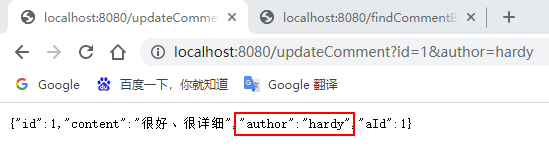

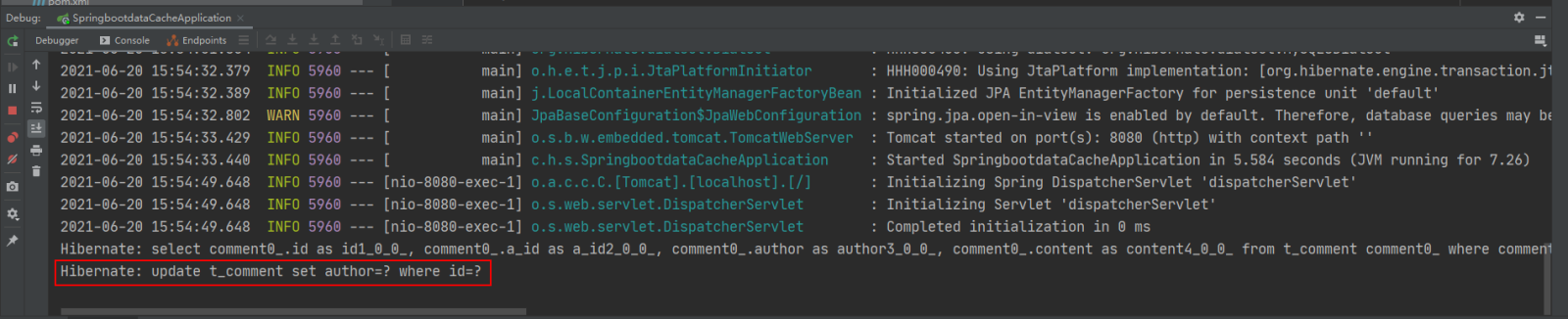
可以看到,执行updateComment()更新id为1的数据时执行了一条更新的SQL语句,后续调用findById()方法查询id为1的用户评论信息时没有再次执行查询的SQL语句,且浏览器返回了更新后的正确结果,这说明@CachePut缓存更新配置成功。
(9)基于注解的Redis缓存删除测试
通过浏览器访问:http://localhost:8080/deleteComment?id=1 和 http://localhost:8080/findCommentById?id=1
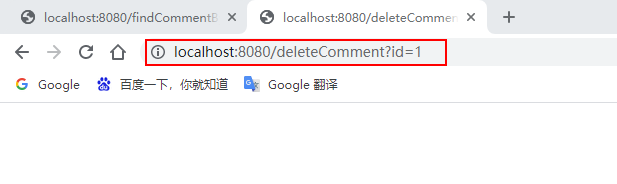
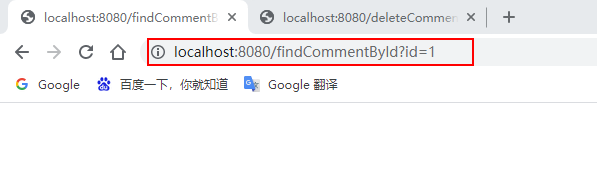
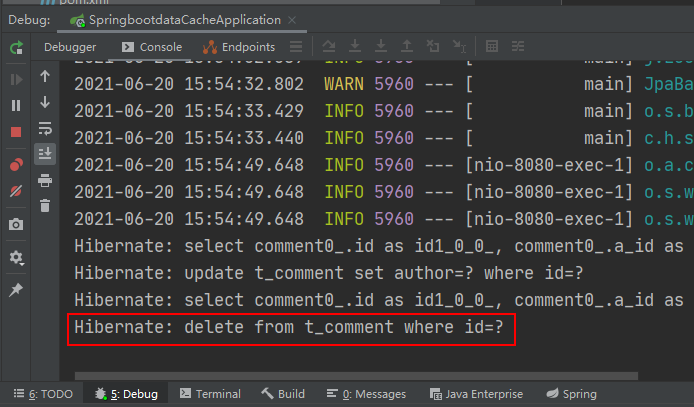
执行deleteComment()方法删除id为1的数据后查询结果为空,查看Redis缓存数据库:
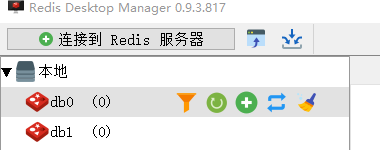
可以看到之前存储的comment相关数据被删除掉了,这表明@CacheEvict注解缓存删除成功实现。
通过上面的案例可以看出:使用基于注解的Redis缓存实现只需要添加Redis依赖、并使用几个注解在对应的方法上,就可以实现对数据的缓存管理。
另外,还可以在SpringBoot全局配置文件中配置Redis有效期,示例代码如下:
# 对基于注解的Redis缓存数据统一设置有效期为1分钟,单位毫秒
spring.cache.redis.time-to-live=60000
上述代码中,在SpringBoot全局配置文件中添加了“spring.cache.redis.time-to-live”属性统一设置Redis数据的有效期(单位为毫秒),但这种方式不够灵活,因此一般不用。
在SpringBoot整合Redis缓存实现中,除了基于注解形式的Redis缓存形式外,还有一种开发中更常用的方式——基于API的Redis缓存实现。这种基于API的Redis缓存实现,需要在某种业务需求下通过Redis提供的API调用相关方法实现数据缓存管理。同时,这种方法还可以手动管理缓存的有效期。
下面,通过Redis API的方式讲解SpringBoot整合Redis缓存的具体实现。
(1)使用Redis API进行业务数据缓存管理
在 com.hardy.springbootdatacache.service 包下新建一个 ApiCommentService:
package com.hardy.springbootdatacache.service;

import com.hardy.springbootdatacache.entity.Comment;
import com.hardy.springbootdatacache.repository.CommentRepository;
import org.springframework.beans.factory.annotation.Autowired;
import org.springframework.cache.annotation.CacheEvict;
import org.springframework.cache.annotation.CachePut;
import org.springframework.cache.annotation.Cacheable;
import org.springframework.data.redis.core.RedisTemplate;
import org.springframework.stereotype.Service;

import j*a.util.Optional;
import j*a.util.concurrent.TimeUnit;

/**
 * @Author: HardyYao
 * @Date: 2025/6/19
 */
@Service
public class ApiCommentService {

    @Autowired
    private CommentRepository commentRepository;

    @Autowired
    private RedisTemplate redisTemplate;

    /**
     * 根据评论id查询评论
     * @param id
     * @return
     */
    public Comment findCommentById(Integer id){
        // 先查Redis缓存
        Object o = redisTemplate.opsForValue().get("comment_" + id);
        if (o != null) {
            return (Comment) o;
        } else {
            // 如果缓存中没有,则从数据库查询
            Optional<Comment> dbComment = commentRepository.findById(id);
            if (dbComment.isPresent()) {
                Comment redisComment = dbComment.get();
                // 将查询结果存储到缓存中,并设置有效期为1天
                redisTemplate.opsForValue().set("comment_"+id, redisComment,1, TimeUnit.DAYS);
                return redisComment;
            } else {
                return null;
            }
        }

    }

    /**
     * 更新评论
     * @param comment
     * @return
     */
    public Comment updateComment(Comment comment) {
        commentRepository.updateComment(comment.getAuthor(), comment.getId());
        // 更新数据库数据后进行缓存更新
        redisTemplate.opsForValue().set("comment_" + comment.getId(), comment);
        return comment;
    }

    /**
     * 删除评论
     * @param comment_id
     */
    public void deleteComment(int comment_id) {
        commentRepository.deleteById(comment_id);
        // 删除数据库数据后进行缓存删除
        redisTemplate.delete("comment_" + comment_id);
    }

}
(2)编写Web访问层ApiCommentController
package com.hardy.springbootdatacache.controller;

import com.hardy.springbootdatacache.entity.Comment;
import com.hardy.springbootdatacache.service.ApiCommentService;
import org.springframework.beans.factory.annotation.Autowired;
import org.springframework.web.bind.annotation.RequestMapping;
import org.springframework.web.bind.annotation.RestController;

/**
 * @Author: HardyYao
 * @Date: 2025/6/19
 */
@RestController
@RequestMapping("api")  // 改变请求路径
public class ApiCommentController {

    @Autowired
    private ApiCommentService apiCommentService;

    @RequestMapping(value = "/findCommentById")
    public Comment findCommentById(Integer id){
        Comment comment = apiCommentService.findCommentById(id);
        return comment;
    }

    @RequestMapping(value = "/updateComment")
    public Comment updateComment(Comment comment){
        Comment oldComment = apiCommentService.findCommentById(comment.getId());
        oldComment.setAuthor(comment.getAuthor());
        Comment comment1 = apiCommentService.updateComment(oldComment);
        return comment1;
    }

    @RequestMapping(value = "/deleteComment")
    public void deleteComment(Integer id){
        apiCommentService.deleteComment(id);
    }

}
(3)测试基于API的Redis缓存实现
输入:http://localhost:8080/api/findCommentById?id=2(连续输入三次)、http://localhost:8080/api/updateComment?id=2&author=hardy、http://localhost:8080/deleteComment?id=2进行访问:
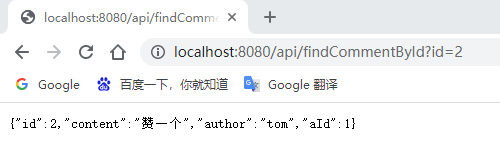
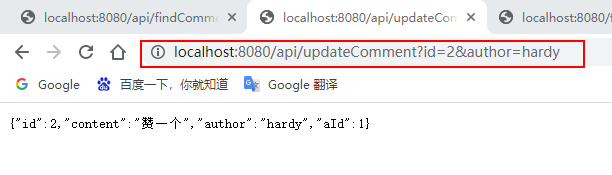
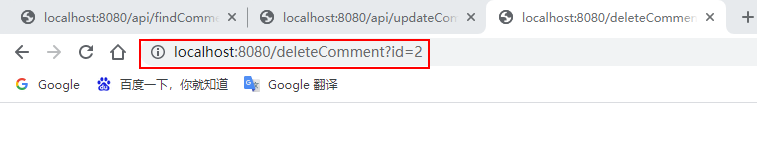
查看控制台消息及Redis数据库:
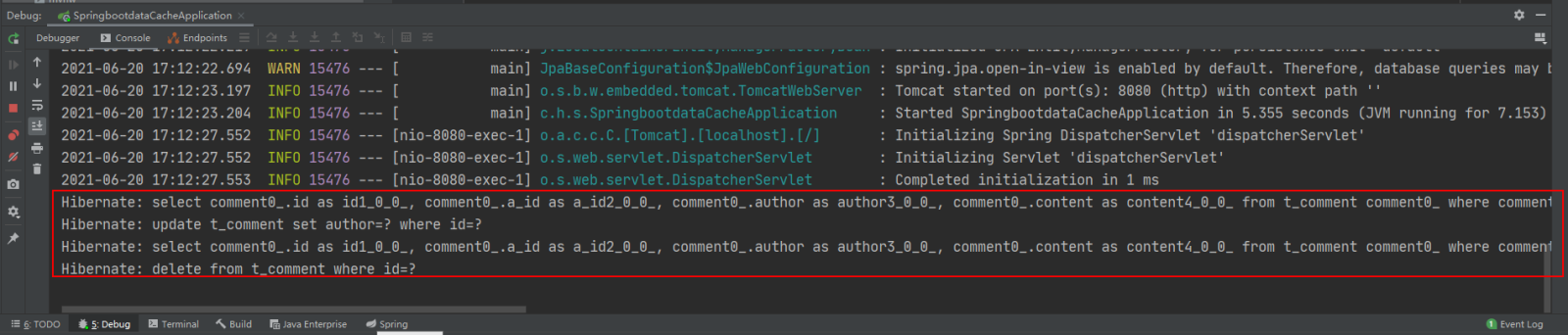

基于API的Redis缓存实现的相关配置:基于API的Redis缓存实现不需要@EnableCaching注解开启基于注解的缓存支持,所以这里可以选择将添加在项目启动类上的@EnableCaching注解进行删除或者注释,不会影响项目的功能实现。
以上就是SpringBoot整合Redis缓存实现的方法的详细内容,更多请关注其它相关文章!
# SpringBoot
# 荆州抖音推广招聘网站
# 序列化
# 可以看到
# 客户端
# 多个
# 还可以
# 为空
# 配置文件
# 查询结果
# 启动器
# 管理器
# redis
# 用阿里云做网站推广好吗
# XXX欧美群交SEO
# 支付宝账单+关键词排名
# 淄博网站关键词推广公司
# 商丘网站优化简历设计
# 百度网站推广后台
# 桥西区整合营销推广
# 巴厘岛餐饮推广网站
# 营销方法推广商品怎么写
相关栏目:
【
Google疑问12 】
【
Facebook疑问10 】
【
优化推广96088 】
【
技术知识133117 】
【
IDC资讯59369 】
【
网络运营7196 】
【
IT资讯61894 】
相关推荐:
抖音怎么解除第三方绑定_抖音解除第三方平台绑定方法介绍
C++ static关键字作用_C++静态成员变量与静态函数
抖音号升级企业号怎么改名字?升级企业号有哪些好处?
谷歌邮箱官方入口链接 谷歌邮箱网页版电脑端快速登录
无人机考证官网 中国民航无人机考证官网登录入口
Python中安全地将环境变量转换为整数的类型注解指南
韩剧圈正版官网入口_韩剧圈官方指定登录
苹果手机聊天记录删除了如何恢复
j*a中ArrayBlockingQueue的使用
Go语言反射机制:如何访问被嵌入结构体遮蔽的方法
创客贴登录页面入口 创客贴网页版最新网址链接
青橙手机语音助手怎么唤醒_青橙手机语音助手设置与唤醒方法
J*a中的值传递到底指什么_值传递模型在参数传递中的真正含义说明
不吃碳水化合物是健康减肥的好办法吗
抖音号升级成企业资质怎么弄?有什么好处?
抖音火山版如何进行提现
Python中处理嵌套字典与列表的数据提取与过滤教程
利用Flexbox实现图片元素的二维布局:2x2网格排列指南
我的世界官方网址入口 我的世界游戏主页直达入口
windows10怎么开启wsl_windows10安装linux子系统教程
《糖豆》添加舞曲方法
在Django单元测试中优雅处理信号:基于环境的条件执行策略
解决CSS background 属性中 cover 关键字的常见误用
《兴业银行》注册登录方法
使用逻辑应用(Logic Apps)自动处理邮件附件中的XML到Excel
Windows自带的便笺数据如何备份_防止数据丢失的便利贴迁移教程【干货】
高效调试PHP大型嵌套数组:JSON序列化与可视化工具实践
QQ网站入口直接登录 QQ官方正版登录页面
可米酷漫画在线阅读入口_ 可米酷漫画官网直达链接
告别繁琐SEO!如何使用SyliusSitemap插件自动化生成网站地图,提升搜索引擎排名
在PySimpleGUI中实现键盘按键绑定按钮事件
C++中std::thread和std::async的区别_C++并发编程与线程与异步任务比较
使用Python和GBGB API高效抓取指定日期范围和赛道比赛结果教程
C++ bind函数使用教程_C++参数绑定与函数适配器的应用
《异星探险家》古怪的物品作用介绍
Go Goroutine调度与并发执行深度解析
c++如何实现观察者设计模式_c++行为型设计模式实战
excel怎么计算平均值 excel平均函数*ERAGE使用教学
mysql怎么查询数据_mysql基础查询语句使用教程
《理想汽车》权限管理设置方法
如何外贸网站设计-能留住客户提升用户体验!
抖音猜你想搜能说明对方搜过吗
PHP实现等比数列:构建数组元素基于前一个值递增的方法
Linux如何开发轻量级数据服务模块_Linux服务化设计
虫虫助手如何更新游戏
《长生:天机降世》火塔小怪大全
《单词速记宝》设置学习计划方法
12306APP选座怎么选充电位置_12306APP带充电插座座位选择方法与技巧
firefox火狐浏览器最新官网主页_ firefox火狐浏览器平台入口直达官方链接
PHP utf8_encode 字符编码转换陷阱与解决方案
2023-05-28

运城市盐湖区信雨科技有限公司是一家深耕海外推广领域十年的专业服务商,作为谷歌推广与Facebook广告全球合作伙伴,聚焦外贸企业出海痛点,以数字化营销为核心,提供一站式海外营销解决方案。公司凭借十年行业沉淀与平台官方资源加持,打破传统外贸获客壁垒,助力企业高效开拓全球市场,成为中小企业出海的可靠合作伙伴。