本文介绍了基于Deepshop工具箱,利用PaddleGAN的DAIN模型实现视频慢动作效果的方法。先说明DAIN模型原理,它通过估计光流和深度图生成中间帧。接着给出安装PaddleGAN、创建慢动作类的步骤,最后演示模型使用,可指定慢动作速率和处理帧范围,输出慢动作视频。
☞☞☞AI 智能聊天, 问答助手, AI 智能搜索, 免费无限量使用 DeepSeek R1 模型☜☜☜

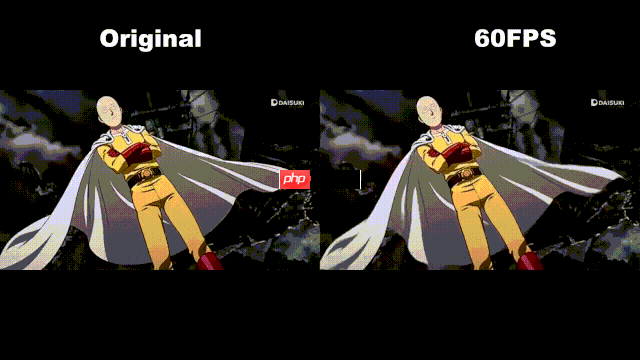
左边为原视频,右边为对第一个跃起动作进行slow motion的视频(只对视频中精彩时刻做slow motion,感觉能看出效果)
PS:视频来自B站
HTML('')
若只是想把视频实现慢动作slow motion效果,直接跳到“3视频慢动作” ,根据说明设置参数即可。若要了解过程,可继续阅读。
1.在图像编辑中有大名鼎鼎的photoshop作为图像处理工具,那在这里我打算也弄个Deepshop作为图像处理的深度工具箱,开箱即用。
2.后续也会陆续整理其他工具,这次整理了视频慢动作工具的
3.至2025年6月,这个模型基于msgnet迁移训练,效果离以假乱真还有点距离,效果还可以继续优化,stylepro_artistic那个迁移可能效果更好,可惜暂时没找到那个可以迁移的,有时间看从头训练一个。
1.随着手机摄像头帧率动不动就120fps,60fps,现在拍慢动作也很简单了。但若原视频只有25fps,30fps的要变成慢动作视频还是可以用DL的方法
2.就是利用ppgan(PaddleGAN中的DAIN模型,原本就是插帧的DL算法,在这里用DAIN插了帧后,保持原视频帧率不增加帧率,只增加了总帧数。相当于增加视频长度,但视频内容的真实时间长度是不变的,所以相当于实现慢动作,处理的那段视频变成慢动作了。
3.这里只是小小修改,方便进行使用而已,技术源自DAIN与PaddlePaddle
当前有不少插帧的深度学习模型,英伟达的Super slomo,上海交大的DAIN。都是为视频插帧,使视频看起来更丝滑。在这里我们把插的帧,不用来提升帧率,而是延长整个视频长度,形成慢动作slow motion效果。
DAIN的全称是Depth-Aware Video Frame Interpolation,2019年的CVPR.官方的github https://github.com/baowenbo/DAIN
 简小派
简小派
简小派是一款AI原生求职工具,通过简历优化、岗位匹配、项目生成、模拟面试与智能投递,全链路提升求职成功率,帮助普通人更快拿到更好的 offer。
 123
查看详情
123
查看详情

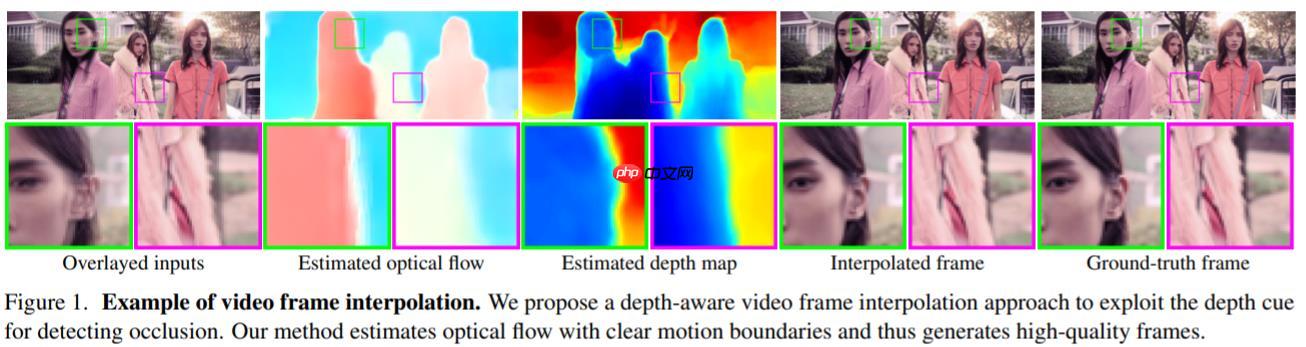
—— 给定两个时刻的输入帧,先估计光流和深度图,然后使用建议的深度感知流投影层生成中间流。然后,模型基于光流和局部插值内核对输入帧、深度图和上下文特征进行扭曲,合成输出帧。这种模型紧凑、高效且完全可微分。
参考自 https://zhuanlan.zhihu.com/p/149395616
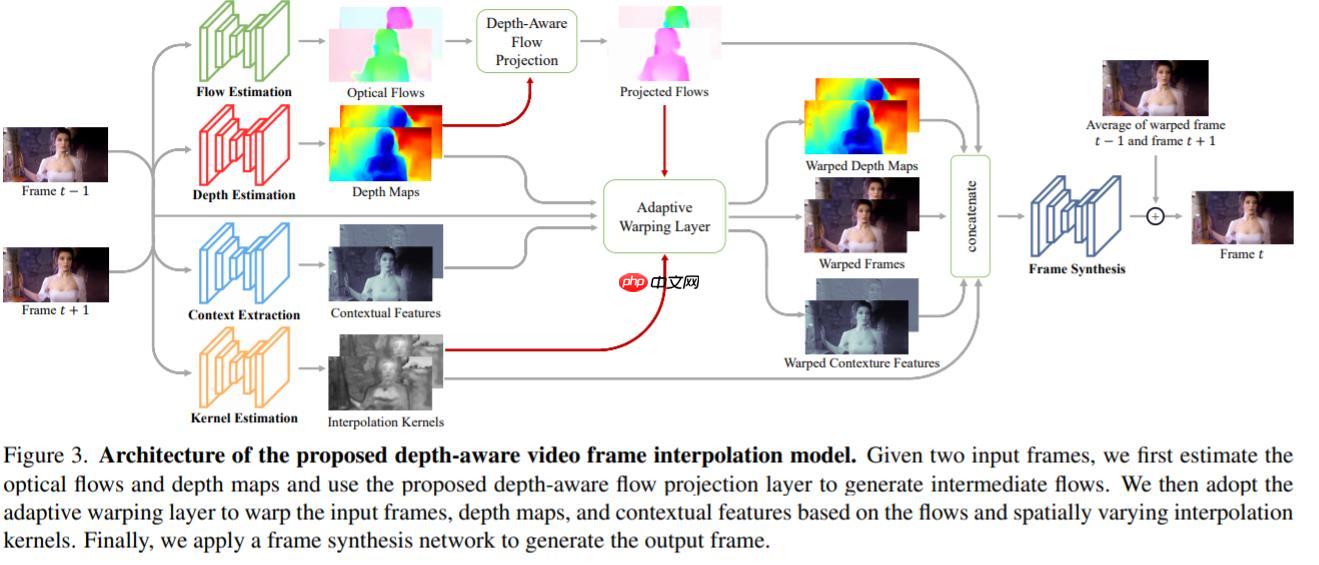
—— 并且,项目并没有预训练的分类网络,而是自己训练了一个内容输出网络来获取高维特征,来给视频插值。
直接调用封装好的类:
In [ ]## 需要插帧的设置TruebaseUse=False## 指定要插帧的视频文件path='/home/aistudio/huaxue.mp4'#if baseUse:
!pip install -q ppgan import paddle from ppgan.apps import DAINPredictor ##需注意用静态图
paddle.enable_static()
dain=DAINPredic tor(output='output',
weight_path=None,
time_step=0.5,
use_gpu=True,
remove_duplicates=False)
dain.run(path)
tor(output='output',
weight_path=None,
time_step=0.5,
use_gpu=True,
remove_duplicates=False)
dain.run(path)
若觉得改一行代码也累,想直接用,可找已有的网页http://distinctai.net/fps ,限制就是:免费试用最大不超过10M,支持MP4、*i、rmvb等多种格式,三次免费
我用最懒方法直接pip安装,有需要的也可以git后安装
In [ ]!pip install -q ppgan
1.在github上追踪DAIN的代码,在 ppgan.apps下面的dain类拷贝出来,进行修改(因改动不少就没有继承DAIN了)
2.主要修改部分是frame合成视频时,及 combine_frames方法。主要改图片的名字,然后放到output/DAIN/frames-combined中
PS:ppgan这里用的是ffmpeg生成视频,指定图片文件夹所在路径来生成。这里注意图片文件名要求从000.png(0开始)一直连续顺序递增(0001.png,0002.png等)!!这里坑了不少时间
In [7]import osimport cv2import globimport shutilimport numpy as npfrom tqdm import tqdmfrom imageio import imread, ims*eimport paddlefrom ppgan.utils.download import get_path_from_urlfrom ppgan.utils.video import video2frames, frames2videofrom ppgan.apps.base_predictor import BasePredictor
paddle.enable_static()
DAIN_WEIGHT_URL = 'https://paddlegan.bj.bcebos.com/applications/DAIN_weight.tar'class DAINSlowMotion(BasePredictor):
def __init__(self,
output='output',
weight_path=None,
use_gpu=True,
remove_duplicates=False):
self.output_path = os.path.join(output, 'DAIN') if weight_path is None:
weight_path = get_path_from_url(DAIN_WEIGHT_URL)
self.weight_path = weight_path #self.time_step = time_step
self.key_frame_thread = 0
self.remove_duplicates = remove_duplicates
self.build_inference_model() def run(self, video_path,slow_rate=0.5,frameIndex=[],interpolateIndex=[]):
self.time_step=slow_rate if len(frameIndex)!=2:
self.frame_start=0
self.frame_end=-1
else:
self.frame_start=frameIndex[0]
self.frame_end=frameIndex[1] if len(interpolateIndex)!=2:
self.interpolate_start=0
self.interpolate_end=-1
else:
self.interpolate_start=interpolateIndex[0]
self.interpolate_end=interpolateIndex[1]
frame_path_input = os.path.join(self.output_path, 'frames-input')
frame_path_interpolated = os.path.join(self.output_path, 'frames-interpolated')
frame_path_combined = os.path.join(self.output_path, 'frames-combined')
video_path_output = os.path.join(self.output_path, 'videos-output') if not os.path.exists(self.output_path):
os.makedirs(self.output_path) if not os.path.exists(frame_path_input):
os.makedirs(frame_path_input) if not os.path.exists(frame_path_interpolated):
os.makedirs(frame_path_interpolated) if not os.path.exists(frame_path_combined):
os.makedirs(frame_path_combined) if not os.path.exists(video_path_output):
os.makedirs(video_path_output)
timestep = self.time_step
num_frames = int(1.0 / timestep) - 1
cap = cv2.VideoCapture(video_path)
fps = cap.get(cv2.CAP_PROP_FPS) print("Old fps (frame rate): ", fps)
times_interp = int(1.0 / timestep)
r2 = str(int(fps) * times_interp) print("New fps (frame rate): ", fps)
out_path = video2frames(video_path, frame_path_input)
vidname = os.path.basename(video_path).split('.')[0]
frames = sorted(glob.glob(os.path.join(out_path, '*.png')))
frames=frames[self.frame_start:self.frame_end] #print('frames',frames)
# if self.remove_duplicates:
# frames = self.remove_duplicate_frames(out_path)
img = imread(frames[0])
int_width = img.shape[1]
int_height = img.shape[0]
channel = img.shape[2] if not channel == 3: return
if int_width != ((int_width >> 7) << 7):
int_width_pad = (((int_width >> 7) + 1) << 7) # more than necessary
padding_left = int((int_width_pad - int_width) / 2)
padding_right = int_width_pad - int_width - padding_left else:
int_width_pad = int_width
padding_left = 32
padding_right = 32
if int_height != ((int_height >> 7) << 7):
int_height_pad = (
((int_height >> 7) + 1) << 7) # more than necessary
padding_top = int((int_height_pad - int_height) / 2)
padding_bottom = int_height_pad - int_height - padding_top else:
int_height_pad = int_height
padding_top = 32
padding_bottom = 32
frame_num = len(frames) if not os.path.exists(os.path.join(frame_path_interpolated, vidname)):
os.makedirs(os.path.join(frame_path_interpolated, vidname)) if not os.path.exists(os.path.join(frame_path_combined, vidname)):
os.makedirs(os.path.join(frame_path_combined, vidname)) for i in tqdm(range(frame_num - 1)): if i < self.interpolate_start or (i>self.interpolate_end and self.interpolate_end>0):continue
first = frames[i]
second = frames[i + 1]
first_index = int(first.split(os.sep)[-1].split('.')[-2])
second_index = int(second.split(os.sep)[-1].split('.')[-2])
img_first = imread(first)
img_second = imread(second) '''--------------Frame change test------------------------'''
#img_first_gray = np.dot(img_first[..., :3], [0.299, 0.587, 0.114])
#img_second_gray = np.dot(img_second[..., :3], [0.299, 0.587, 0.114])
#img_first_gray = img_first_gray.flatten(order='C')
#img_second_gray = img_second_gray.flatten(order='C')
#corr = np.corrcoef(img_first_gray, img_second_gray)[0, 1]
#key_frame = False
#if corr < self.key_frame_thread:
# key_frame = True
'''-------------------------------------------------------'''
X0 = img_first.astype('float32').transpose((2, 0, 1)) / 255
X1 = img_second.astype('float32').transpose((2, 0, 1)) / 255
assert (X0.shape[1] == X1.shape[1]) assert (X0.shape[2] == X1.shape[2])
X0 = np.pad(X0, ((0,0), (padding_top, padding_bottom), \
(padding_left, padding_right)), mode='edge')
X1 = np.pad(X1, ((0,0), (padding_top, padding_bottom), \
(padding_left, padding_right)), mode='edge')
X0 = np.expand_dims(X0, axis=0)
X1 = np.expand_dims(X1, axis=0)
X0 = np.expand_dims(X0, axis=0)
X1 = np.expand_dims(X1, axis=0)
X = np.concatenate((X0, X1), axis=0)
o = self.base_forward(X)
y_ = o[0]
y_ = [
np.transpose( 255.0 * item.clip( 0, 1.0)[0, :, padding_top:padding_top + int_height,
padding_left:padding_left + int_width],
(1, 2, 0)) for item in y_
] if self.remove_duplicates:
num_frames = times_interp * (second_index - first_index) - 1
time_offsets = [
kk * timestep for kk in range(1, 1 + num_frames, 1)
]
start = times_interp * first_index + 1
for item, time_offset in zip(y_, time_offsets):
out_dir = os.path.join(frame_path_interpolated, vidname, "{:08d}.png".format(start))
ims*e(out_dir, np.round(item).astype(np.uint8))
start = start + 1
else:
time_offsets = [
kk * timestep for kk in range(1, 1 + num_frames, 1)
]
count = 1
for item, time_offset in zip(y_, time_offsets):
out_dir = os.path.join(
frame_path_interpolated, vidname, "{:08d}{:01d}.png".format(self.frame_start+i, count))
count = count + 1
ims*e(out_dir, np.round(item).astype(np.uint8))
input_dir = os.path.join(frame_path_input, vidname)
interpolated_dir = os.path.join(frame_path_interpolated, vidname)
combined_dir = os.path.join(frame_path_combined, vidname) ##kevin
##if self.remove_duplicates:
## self.combine_frames_with_rm(input_dir, interpolated_dir,
## combined_dir, times_interp)
## else:
num_frames = int(1.0 / timestep) - 1
self.combine_frames(frames, interpolated_dir, combined_dir,
num_frames)
frame_pattern_combined = os.path.join(frame_path_combined, vidname, '%08d.png') #frame_pattern_combined = sorted(glob.glob(os.path.join(frame_path_combined,vidname, '*.png')))
#print('frame_pattern_combined',frame_pattern_combined)
video_pattern_output = os.path.join(video_path_output, vidname + '.mp4') if os.path.exists(video_pattern_output):
os.remove(video_pattern_output) #kevin
frames2video(frame_pattern_combined, video_pattern_output,str(int (fps))) #
return frame_pattern_combined, video_pattern_output def combine_frames(self, frames, interpolated, combined, num_frames):
frames1 = frames
frames2 = sorted(glob.glob(os.path.join(interpolated, '*.png')))
num1 = len(frames1)
num2 = len(frames2) for i in range(num1):
src = frames1[i]
imgname = int(src.split(os.sep)[-1].split('.')[-2]) if imgname<=self.interpolate_start:
dst=os.path.join(combined,'{:08d}.png'.format(imgname-self.frame_start)) elif imgname<=self.interpolate_end:
dst=os.path.join(combined,'{:08d}.png'.format((imgname-self.interpolate_start)*num_frames+imgname-self.frame_start)) else:
dst=os.path.join(combined,'{:08d}.png'.format((self.interpolate_end-self.interpolate_start)*(num_frames+1) \
+self.interpolate_start+(i-self.interpolate_end)-self.frame_start)) # print('i,imgname',i,imgname)
#assert i == imgname
#dst = os.path.join(combined,
# '{:08d}.png'.format(imgname * (num_frames + 1)))
shutil.copy2(src, dst) #print('dst1',dst)
for i in range(num2): try:
imgname = src.split(os.sep)[-1]
src = frames2[i ] #src2=src[-12:-4]+'_'
dst = os.path.join(
combined,'{:08d}.png'.format((i+self.interpolate_start+1+i//num_frames)-self.frame_start)) #print('dst2',dst)
shutil.copy2(src, dst)
except Exception as e: print(e) def combine_frames_with_rm(self, input, interpolated, combined,
times_interp):
frames1 = sorted(glob.glob(os.path.join(input, '*.png')))
frames2 = sorted(glob.glob(os.path.join(interpolated, '*.png')))
num1 = len(frames1)
num2 = len(frames2) for i in range(num1):
src = frames1[i]
index = int(src.split(os.sep)[-1].split('.')[-2])
dst = os.path.join(combined, '{:08d}.png'.format(times_interp * index))
shutil.copy2(src, dst) for i in range(num2):
src = frames2[i]
imgname = src.split(os.sep)[-1]
dst = os.path.join(combined, imgname)
shutil.copy2(src, dst) def remove_duplicate_frames(self, paths):
def dhash(image, hash_size=8):
gray = cv2.cvtColor(image, cv2.COLOR_BGR2GRAY)
resized = cv2.resize(gray, (hash_size + 1, hash_size))
diff = resized[:, 1:] > resized[:, :-1] return sum([2**i for (i, v) in enumerate(diff.flatten()) if v])
hashes = {}
max_interp = 9
image_paths = sorted(glob.glob(os.path.join(paths, '*.png'))) for image_path in image_paths:
image = cv2.imread(image_path)
h = dhash(image)
p = hashes.get(h, [])
p.append(image_path)
hashes[h] = p for (h, hashed_paths) in hashes.items(): if len(hashed_paths) > 1:
first_index = int(hashed_paths[0].split(
os.sep)[-1].split('.')[-2])
last_index = int(hashed_paths[-1].split(
os.sep)[-1].split('.')[-2]) + 1
gap = 2 * (last_index - first_index) - 1
if gap > 2 * max_interp:
cut1 = len(hashed_paths) // 3
cut2 = cut1 * 2
for p in hashed_paths[1:cut1 - 1]:
os.remove(p) for p in hashed_paths[cut1 + 1:cut2]:
os.remove(p) for p in hashed_paths[cut2 + 1:]:
os.remove(p) if gap > max_interp:
mid = len(hashed_paths) // 2
for p in hashed_paths[1:mid - 1]:
os.remove(p) for p in hashed_paths[mid + 1:]:
os.remove(p) else: for p in hashed_paths[1:]:
os.remove(p)
frames = sorted(glob.glob(os.path.join(paths, '*.png'))) return frames
!rm -rf /home/aistudio/output/DAIN#慢动作速率,0.25相当于 新生成3帧slow_rate=0.25# 待处理视频路径path='/home/aistudio/shijinsai.mp4'## 裁切视频videoIndex=[a,b],到时候只输出视频的第a帧到第b帧,整个视频则设空数组[]videoIndex=[]## 裁切视频,先把第几帧到第几帧的视频切出来,不切取视频则设空数组[],这里还是原视频的帧数slowIndex=[120,150]
dain=DAINSlowMotion(output='output',
                 weight_path=None,
                 use_gpu=True,
                 remove_duplicates=False)##输出视频在 output/DAIN/videos-outputdain.run(path,slow_rate,videoIndex,slowIndex)
[07/09 16:24:17] ppgan INFO: Found /home/aistudio/.cache/ppgan/DAIN_weight.tar [07/09 16:24:17] ppgan INFO: Decompressing /home/aistudio/.cache/ppgan/DAIN_weight.tar...
2025-07-09 16:24:17,776-WARNING: The old way to load inference model is deprecated. model path: /home/aistudio/.cache/ppgan/DAIN_weight/model, params path: /home/aistudio/.cache/ppgan/DAIN_weight/params
Old fps (frame rate):  25.0
New fps (frame rate):  25.0
  0%|          | 0/356 [00:00<?, ?it/s]
 34%|███▍      | 121/356 [00:08<00:16, 14.55it/s]
 34%|███▍      | 122/356 [00:16<10:19,  2.65s/it]
 35%|███▍      | 123/356 [00:25<16:37,  4.28s/it]
 35%|███▍      | 124/356 [00:32<20:33,  5.32s/it]
 35%|███▌      | 125/356 [00:40<23:05,  6.00s/it]
 35%|███▌      | 126/356 [00:48<25:03,  6.54s/it]
 36%|███▌      | 127/356 [00:55<25:32,  6.69s/it]
 36%|███▌      | 128/356 [01:05<29:03,  7.65s/it]
 36%|███▌      | 129/356 [01:10<26:28,  7.00s/it]
 37%|███▋      | 130/356 [01:17<26:01,  6.91s/it]
 37%|███▋      | 131/356 [01:24<26:06,  6.96s/it]
 37%|███▋      | 132/356 [01:32<26:45,  7.17s/it]
 37%|███▋      | 133/356 [01:40<27:55,  7.51s/it]
 38%|███▊      | 134/356 [01:49<29:11,  7.89s/it]
 38%|███▊      | 135/356 [01:57<29:48,  8.09s/it]
 38%|███▊      | 136/356 [02:06<30:23,  8.29s/it]
 38%|███▊      | 137/356 [02:15<30:41,  8.41s/it]
 39%|███▉      | 138/356 [02:23<31:03,  8.55s/it]
 39%|███▉      | 139/356 [02:32<31:01,  8.58s/it]
 39%|███▉      | 140/356 [02:41<30:58,  8.60s/it]
 40%|███▉      | 141/356 [02:49<30:52,  8.61s/it]
 40%|███▉      | 142/356 [02:58<30:17,  8.49s/it]
 40%|████      | 143/356 [03:06<29:57,  8.44s/it]
 40%|████      | 144/356 [03:14<29:34,  8.37s/it]
 41%|████      | 145/356 [03:22<29:16,  8.32s/it]
 41%|████      | 146/356 [03:30<28:32,  8.15s/it]
 41%|████▏     | 147/356 [03:38<27:50,  7.99s/it]
 42%|████▏     | 148/356 [03:45<27:06,  7.82s/it]
 42%|████▏     | 149/356 [03:52<26:17,  7.62s/it]
 42%|████▏     | 150/356 [03:59<25:40,  7.48s/it]
100%|██████████| 356/356 [04:06<00:00,  1.44it/s]
('output/DAIN/frames-combined/shijinsai/%08d.png',
 'output/DAIN/videos-output/shijinsai.mp4')
代码解释
以上就是DS之slow motion利用PaddleGAN的DAIN模型实现视频慢动作的详细内容,更多请关注其它相关文章!
# b站
# 工具
# git
# 中文网
# 图像处理
# 插值
# 在这里
# type
# latte
# udio
# red
# pip安装
# ai
# 的是
# 抖音seo技术团队介绍
# 独山网站建设营销
# 移动端 大图seo
# 网站建设的栏目内容是
# 帧数
# 都是
# 动作类
# 安装包
# 一键
# 湖北秭归县免费网站推广
# seo如何优化金口碑
# 快速优化网站在用易速达
# 网站推广用什么软件做好
# 锦州企业网站建设系统
# 平凉新媒体营销推广
相关栏目:
【
Google疑问12 】
【
Facebook疑问10 】
【
优化推广96088 】
【
技术知识133117 】
【
IDC资讯59369 】
【
网络运营7196 】
【
IT资讯61894 】
相关推荐:
周鸿祎参加中美青年科技创新峰会,分享人工智能创新机遇
移远通信率先完成多场5G NTN技术外场验证,为卫星物联网应用落地提速
美图发布国内首个“懂美学的”AI视觉大模型MiracleVision
微软在 Bing 和 Edge 浏览器中拓展网购服务,帮用户选购心仪产品
组建团队,字节跳动要造机器人?
数字文明尼山对话 | 在东方圣城与AI潮流梦幻联动,看“智慧大脑”让数字山东更美好
如何用AI重塑你的工作流(一)
此「错」并非真的错:从四篇经典论文入手,理解Transformer架构图「错」在何处
智能电网技术:提高能源效率和可靠性
人工智能创作的“婴儿版超级英雄”,你觉得哪个最可爱
中国气象局预测:到 2030 年,中国人工智能气象应用将达到国际领先水平
J*a与人工智能结合:构建智能云服务
第二届光合组织AI解决方案大赛赛果揭晓
马斯克:将来机器人比人类多!特斯拉机器人亮相人工智能大会
大模型训练成本降低近一半!新加坡国立大学最新优化器已投入使用
2025智源大会AI安全话题备受关注,《人机对齐》新书首发
自己动手使用AI技术实现数字内容生产
赋能金融新生态,多家银行创新应用成果亮相世界人工智能大会
一次购买全年省心,入手科沃斯这几台机器人,省下时间就是金钱
两型无人机完成交付!国家级机动观测业务正式启动
中国联通推出“极光一号”5G机载终端,适配大疆等品牌无人机设备
直击上影节 | 光线传媒董事长王长田谈新技术:未来VR放映效果可能媲美影院
科技有狠活|时光修复师 :用AI让昨日重现
工业机器人及非标自动化设备集成服务提供商
烟台大学学生首次在全国大学生无人机航拍竞赛中获奖
高质量数据推动AI场景化应用快速发展及落地
深圳人工智能企业超1900家
CharacterAI - 也许会成为会话人工智能的未来
首届亚太网络法实务大会召开 九位大咖探讨元宇宙与人工智能发展
明略科技发布免费开源TensorBoard.cpp,促进大型模型的预训练工作
五个IntelliJ IDEA插件,高效编写代码
猿力科技入选北京市通用人工智能产业创新伙伴计划
水路两栖艇、消防灭火机器人……这个展览“黑科技”抢眼
能抓取玻璃碎片、水下透明物,清华提出通用型透明物体抓取框架,成功率极高
人工智能正在弥合认知和表达之间的鸿沟
XREAL Beam 投屏盒子正式发布:支持“可悬停 AR 空间屏”
AI生成新闻网站数量激增,正在疯狂赚取广告收入
AI大举入侵内容行业,哪些上市*及动漫公司进行了布局?
马斯克预测:特斯拉全自动驾驶将在今年实现 对AI深度变化感到担忧
无人机自主巡检为高海拔输电线路运维添“新彩”
掌阅科技对话式AI应用“阅爱聊”开启内测
谷歌计划在上海举办开发者大会,重点关注机器学习和生成式AI领域
海南科技职业大学第25届中国机器人及人工智能大赛海南赛区荣获一等奖等114项
“一般智力”与工艺学批判是认识AI的重要入口 | 社会科学报
田渊栋团队新研究:微调
网易云音乐和小冰推出AI歌手音乐创作软件,首发内置12名AI歌手
AI新视野,增长新势能,伙伴云受邀出席笔记侠创业讲真话AI峰会
定义人工智能的十个关键术语
GPT-4最全攻略来袭!OpenAI官方发布,六个月攒下来的使用经验都在里面了
广州团建公司方案 | 绝密飞行 → X-PLANE无人机团建主题团建
2025-07-18

运城市盐湖区信雨科技有限公司是一家深耕海外推广领域十年的专业服务商,作为谷歌推广与Facebook广告全球合作伙伴,聚焦外贸企业出海痛点,以数字化营销为核心,提供一站式海外营销解决方案。公司凭借十年行业沉淀与平台官方资源加持,打破传统外贸获客壁垒,助力企业高效开拓全球市场,成为中小企业出海的可靠合作伙伴。

 tor(output='output',
weight_path=None,
time_step=0.5,
use_gpu=True,
remove_duplicates=False)
dain.run(path)
tor(output='output',
weight_path=None,
time_step=0.5,
use_gpu=True,
remove_duplicates=False)
dain.run(path)